Private Math Tutor Joomla Template


Edit Template Offline
2. Create new page and search for id 6627346
Edit Template Online
Create Awesome Websites


Free Nicepage Builder
Keywords
Subject Programs and Lesson Packages Divide the CMS Content
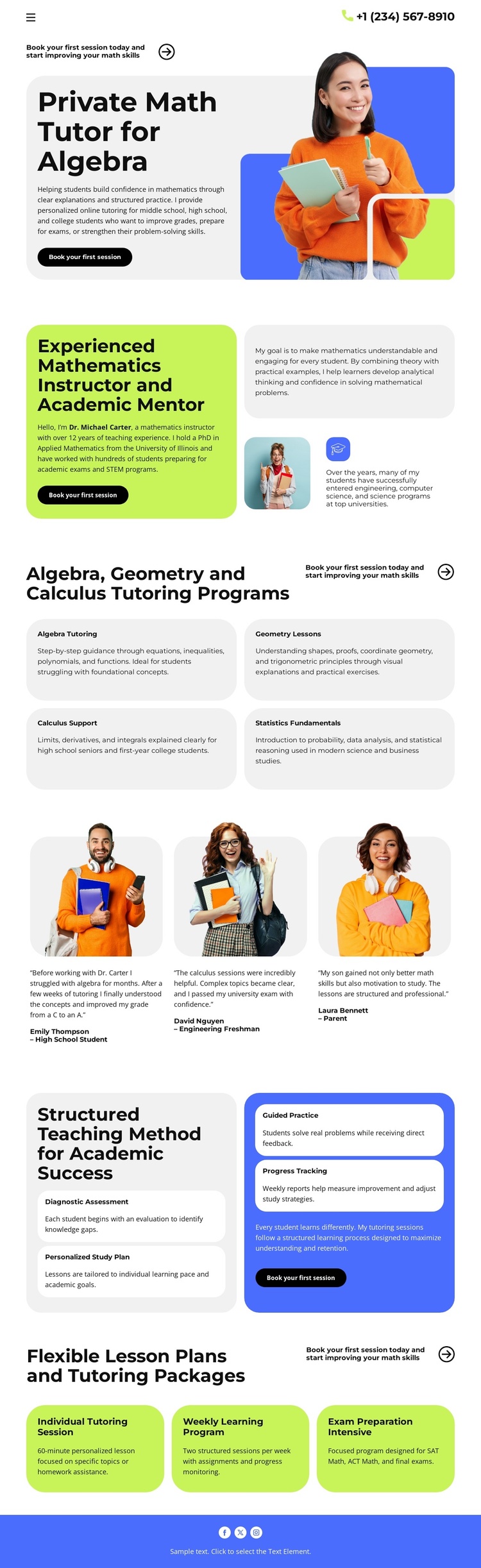
The design separates its tutoring information into recurring content areas that can be understood clearly within a CMS-managed site. The four subject cards identify Algebra Tutoring, Geometry Lessons, Calculus Support, and Statistics Fundamentals as related but distinct program groups. Their shared card treatment gives structured educational content a consistent presentation while allowing the wording and supporting material for each subject to change independently.
The instructor section and the three-person testimonial row serve different content roles. The instructor area introduces the academic mentor and reinforces the tutoring context, while the testimonial cards provide a repeated feedback region. Farther down the page, the four method cards explain Diagnostic Assessment, Personalized Study Plan, Guided Practice, and Progress Tracking as an ordered teaching approach. These regions could remain visually coordinated while their content is maintained as separate informational areas in a Joomla project.
The three package cards add another structured group: Individual Tutoring, Weekly Learning, and Intensive Preparation. Together with the header phone contact and the repeated “Book your first session” actions, they give the page identifiable navigation and contact priorities without requiring a claim that Joomla Articles or modules already exist in the template. The design’s value for Joomla lies in the way its subject, process, feedback, package, and contact regions are already divided into manageable content responsibilities.
Customize with Nicepage
Open this ready-made template in the Joomla Page Builder and customize it visually in the Nicepage editor. Replace demo content, edit page sections, and adapt the design to your project without rebuilding the template from scratch.
Work With This Template in Joomla
Customize and Install the Joomla Template
Start with this ready-made template instead of building the Joomla design from scratch. Customize its layout, content, typography, images, sections, and other design elements visually in the Nicepage application, then export and install the Joomla Template, Nicepage Extension, and supported content on your Joomla website.
Edit the Template Directly in Joomla
After installation, you can edit the Joomla Template directly in Joomla with the Nicepage Joomla Extension. Customize the Header, Footer, Colors, Fonts, typography, and Page Templates from the Joomla workflow while keeping the site design connected with your CMS content.
Edit Joomla Articles Visually
Use the Nicepage Joomla Extension to open and edit Joomla Articles visually from the Joomla Administrator. Change text, images, sections, layouts, and other page content in the Nicepage editor while continuing to manage the Articles through Joomla.
Joomla Content and Template Integration
Use the customized template together with Joomla Articles, module Positions, menus, forms, Blog Pages, and other supported CMS elements. With the Nicepage Extension used as the Site Style Source, shared design settings can be applied across Joomla Articles while Joomla continues to provide the CMS environment for managing site content.
This workflow combines a ready-made Joomla Template with visual customization, direct template editing in Joomla, and continued content management through the Nicepage Joomla Extension.