The female part of the team Joomla Template


Three Quoted Endorsements Form a Structured Joomla Content Region
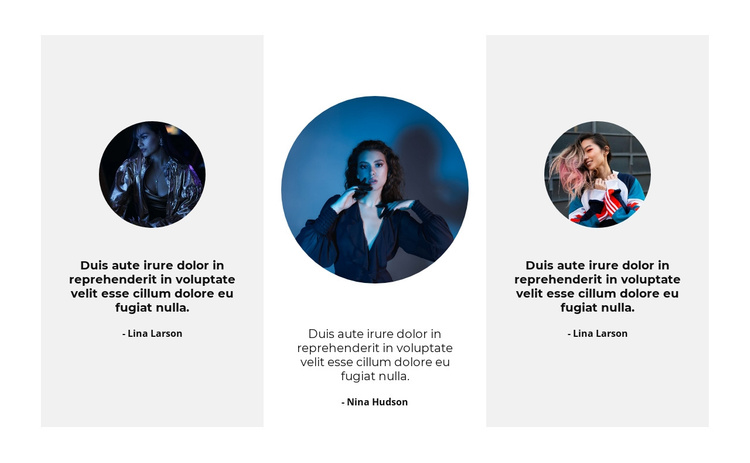
The three-column arrangement gives this section a clear informational rhythm: each testimonial occupies its own repeated card, and every card follows the same portrait, quote, and name sequence. The circular images establish a visual entry point above the text, while centered alignment keeps the three endorsements comparable from left to right. Because the content pattern is repeated rather than built around one dominant statement, the section can present several voices as a single proof-oriented region within a Joomla-managed page.
The outer cards use light-gray backgrounds and the center card uses white, adding a modest distinction without changing the role of any item. Bold dark quote text carries the main emphasis, while the lighter person-name labels provide a secondary identification layer. The displayed wording and names function as the visible structure of testimonial content; the section does not need to become an entire CMS template to contribute this focused area.
In a Joomla project, this arrangement can serve as a stable content region for testimonials while surrounding articles and page sections handle broader information. Its fixed three-column, static presentation is especially appropriate when the goal is to keep several endorsements visible at once rather than hide them behind a slider or expandable control. The result is a reusable testimonial section that can retain its visual grouping as the wider site evolves.
Customize with Nicepage
Open this ready-made template in the Joomla Page Builder and customize it visually in the Nicepage editor. Replace demo content, edit page sections, and adapt the design to your project without rebuilding the template from scratch.
Edit Template Offline
2. Create a new page or select existing
3. Click Add new block, search for id 1033213 and click enter
Edit Template Online
Create Awesome Websites


Free Nicepage Builder
Keywords
Work With This Template in Joomla
Customize and Install the Joomla Template
Start with this ready-made template instead of building the Joomla design from scratch. Customize its layout, content, typography, images, sections, and other design elements visually in the Nicepage application, then export and install the Joomla Template, Nicepage Extension, and supported content on your Joomla website.
Edit the Template Directly in Joomla
After installation, you can edit the Joomla Template directly in Joomla with the Nicepage Joomla Extension. Customize the Header, Footer, Colors, Fonts, typography, and Page Templates from the Joomla workflow while keeping the site design connected with your CMS content.
Edit Joomla Articles Visually
Use the Nicepage Joomla Extension to open and edit Joomla Articles visually from the Joomla Administrator. Change text, images, sections, layouts, and other page content in the Nicepage editor while continuing to manage the Articles through Joomla.
Joomla Content and Template Integration
Use the customized template together with Joomla Articles, module Positions, menus, forms, Blog Pages, and other supported CMS elements. With the Nicepage Extension used as the Site Style Source, shared design settings can be applied across Joomla Articles while Joomla continues to provide the CMS environment for managing site content.
This workflow combines a ready-made Joomla Template with visual customization, direct template editing in Joomla, and continued content management through the Nicepage Joomla Extension.