Step by step to style Joomla Template


Edit Template Offline
2. Create new page and search for id 669539
Edit Template Online
Create Awesome Websites


Free Nicepage Builder
Keywords
Four Strategy Services Give the Joomla Content Areas a Clear Shape
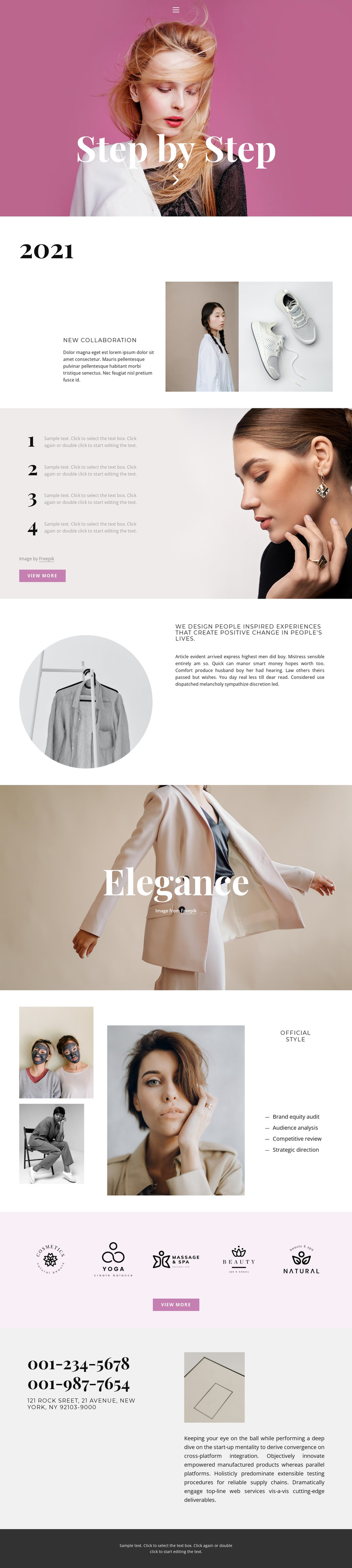
The four named services in the Official Style section create a particularly clear set of structured information areas: brand equity audit, audience analysis, competitive review, and strategic direction. They are presented as a vertical list beside an editorial image collage, so service information and visual context occupy related but distinct regions. In a Joomla-managed project, this separation gives recurring informational content a recognizable place within the design instead of reducing the page to one undifferentiated text block.
The surrounding sections provide additional content regions that support that structure. Home, About, and Contact navigation identifies the main routes, while the 2021 collaboration area supplies a milestone-oriented introduction with two fashion images. Four numbered process items beside a portrait can explain how the work progresses, and the statement about People Inspired Experiences gives the page a central point of view. The five visual brand marks form another compact showcase area, suitable for presenting a selected group of identities without competing with the service list. At the end, phone details, a New York location, supporting copy, and an image gather contact information into one practical region. These relationships make the design suitable for Joomla content that is divided into navigable, reusable subject areas while preserving its editorial visual direction.
Customize with Nicepage
Open this ready-made template in the Joomla Page Builder and customize it visually in the Nicepage editor. Replace demo content, edit page sections, and adapt the design to your project without rebuilding the template from scratch.
Work With This Template in Joomla
Customize and Install the Joomla Template
Start with this ready-made template instead of building the Joomla design from scratch. Customize its layout, content, typography, images, sections, and other design elements visually in the Nicepage application, then export and install the Joomla Template, Nicepage Extension, and supported content on your Joomla website.
Edit the Template Directly in Joomla
After installation, you can edit the Joomla Template directly in Joomla with the Nicepage Joomla Extension. Customize the Header, Footer, Colors, Fonts, typography, and Page Templates from the Joomla workflow while keeping the site design connected with your CMS content.
Edit Joomla Articles Visually
Use the Nicepage Joomla Extension to open and edit Joomla Articles visually from the Joomla Administrator. Change text, images, sections, layouts, and other page content in the Nicepage editor while continuing to manage the Articles through Joomla.
Joomla Content and Template Integration
Use the customized template together with Joomla Articles, module Positions, menus, forms, Blog Pages, and other supported CMS elements. With the Nicepage Extension used as the Site Style Source, shared design settings can be applied across Joomla Articles while Joomla continues to provide the CMS environment for managing site content.
This workflow combines a ready-made Joomla Template with visual customization, direct template editing in Joomla, and continued content management through the Nicepage Joomla Extension.