Relaxation in a spa studio WordPress Theme


Permanent Facility Content With a Clear Visual Focus
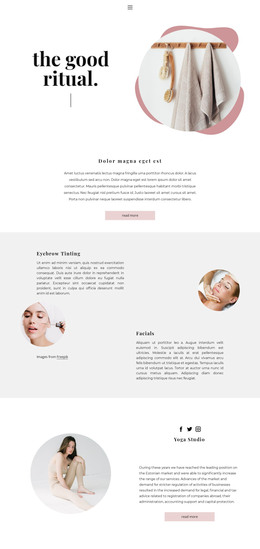
The heading and facility paragraph read as stable page content: they introduce the SPA Center and explain what visitors can find there. The description brings together indoor and kiddy pools, a jacuzzi, steam room, sauna, Turkish bath, massage rooms, and coiffeurs, making the block suitable for a lasting wellness or personal-care section rather than a time-sensitive update. Three social media links sit below the copy as a separate supporting element, giving visitors an additional way to connect with the center.
In a WordPress-managed page, this block can serve as a visually consistent section for permanent introductory content while other page areas provide more detailed services, appointment information, testimonials, or contact options. The left-hand still-life image establishes the spa setting through towels, stones, bath salts, flowers, and accessories. On the right, the large black heading and compact dark text create a straightforward reading path against the pale vertical-texture background. Generous whitespace prevents the long facility description from feeling crowded.
The block’s value in this context comes from the relationship between durable content and a distinctive visual arrangement. It can remain a recognizable SPA Center section as surrounding page content evolves, while the three pink social icons add a modest connection layer. The section contributes focused page content without being treated as a complete theme or site.
Customize with Nicepage
Open this ready-made template in the WordPress Website Builder and customize it visually in the Nicepage editor. Replace demo content, edit page sections, and adapt the design to your project without rebuilding the template from scratch.
Edit Template Offline
2. Create a new page or select existing
3. Click Add new block, search for id 68855 and click enter
Edit Template Online
Create Awesome Websites


Free Nicepage Builder
Keywords
Manage and Edit This Theme in WordPress
Customize and Install the WordPress Theme
Start with this ready-made theme instead of building the WordPress design from scratch. Customize its layout, content, typography, images, sections, and other design elements visually in Nicepage editor, then export and install the WordPress Theme, Plugin, and Pages on your WordPress site. The Nicepage WordPress Plugin lets you continue working with the site after installation.
Edit the Theme Directly in WordPress
After installation, you can edit the WordPress Theme directly in WordPress with the Nicepage WordPress Plugin. Use Site Style to customize site Colors, Fonts, Header, Footer, Blog, and Post Page Templates while working within your WordPress website.
Edit WordPress Pages Visually
Use the Nicepage WordPress Plugin to edit page content directly from the WordPress admin area. Open a WordPress Page with Nicepage and visually change its text, images, sections, and other page elements while continuing to manage the Page through WordPress.
WordPress Content and Theme Integration
Use the customized theme with WordPress Pages, Posts, Blog and Post Templates, menus, widgets, and other CMS-managed content. Shared theme elements such as Colors, Fonts, Header, Footer, Blog, and Post Page Templates can be managed as part of the overall site design, while WordPress provides the CMS environment for managing site content.
This workflow combines a ready-made WordPress Theme with visual customization, direct theme editing in WordPress, and continued content management through the Nicepage WordPress Plugin.