
Dictionary Translation Bureau WordPress Theme


Edit Template Offline
2. Create new page and search for id 6653798
Edit Template Online
Create Awesome Websites


Free Nicepage Builder
Keywords
Service Pages and Industry Content Fit a WordPress-Oriented Theme
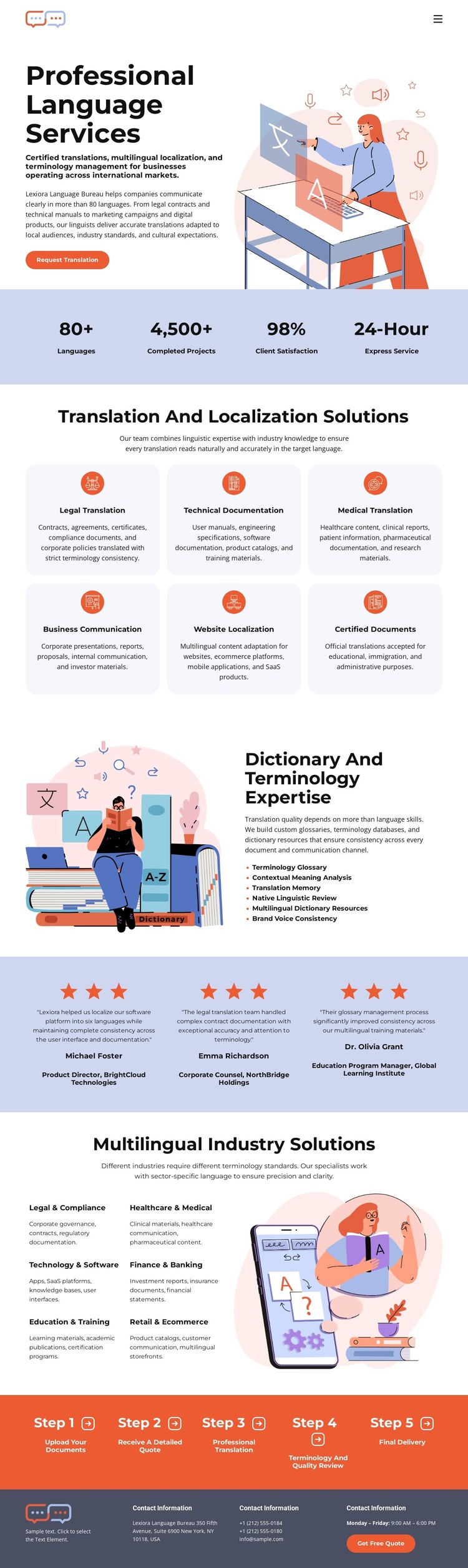
The six service cards provide a natural page-oriented content foundation for a WordPress-managed translation site. Each card identifies a distinct area—legal translation, technical documentation, medical translation, business communication, website localization, or certified documents—so the visual theme can support permanent explanatory content rather than only a generic homepage summary. The dictionary and terminology section adds another durable information area focused on specialist knowledge.
The industry section offers a different relationship to the same subject. Legal and compliance, healthcare and medical, technology and software, and education and training organize the bureau’s relevance by audience or field, while the testimonial band supplies repeated proof content. The five-step process can remain a stable service explanation, and the contact footer provides shared information with the closing quote action. Together, these parts create a visual system capable of holding page content that may be expanded or updated over time.
The analysis does not verify WordPress Posts, blog layouts, categories, or an existing CMS structure, so those should not be treated as present template elements. The safer interpretation is that the design’s service areas, industry groupings, testimonials, process, and contact content can be mapped to WordPress-managed pages and related content as a project develops. Its benefit is continuity: new content can retain the established palette, card treatment, illustrations, and typography instead of introducing an unrelated visual direction.
Customize with Nicepage
Open this ready-made template in the WordPress Website Builder and customize it visually in the Nicepage editor. Replace demo content, edit page sections, and adapt the design to your project without rebuilding the template from scratch.
Manage and Edit This Theme in WordPress
Customize and Install the WordPress Theme
Start with this ready-made theme instead of building the WordPress design from scratch. Customize its layout, content, typography, images, sections, and other design elements visually in Nicepage editor, then export and install the WordPress Theme, Plugin, and Pages on your WordPress site. The Nicepage WordPress Plugin lets you continue working with the site after installation.
Edit the Theme Directly in WordPress
After installation, you can edit the WordPress Theme directly in WordPress with the Nicepage WordPress Plugin. Use Site Style to customize site Colors, Fonts, Header, Footer, Blog, and Post Page Templates while working within your WordPress website.
Edit WordPress Pages Visually
Use the Nicepage WordPress Plugin to edit page content directly from the WordPress admin area. Open a WordPress Page with Nicepage and visually change its text, images, sections, and other page elements while continuing to manage the Page through WordPress.
WordPress Content and Theme Integration
Use the customized theme with WordPress Pages, Posts, Blog and Post Templates, menus, widgets, and other CMS-managed content. Shared theme elements such as Colors, Fonts, Header, Footer, Blog, and Post Page Templates can be managed as part of the overall site design, while WordPress provides the CMS environment for managing site content.
This workflow combines a ready-made WordPress Theme with visual customization, direct theme editing in WordPress, and continued content management through the Nicepage WordPress Plugin.





















