
Retail POS Software WordPress Theme


Edit Template Offline
2. Create new page and search for id 6652702
Edit Template Online
Create Awesome Websites


Free Nicepage Builder
Keywords
Product Pages, Repeated Capability Content, and a Shared Offer System
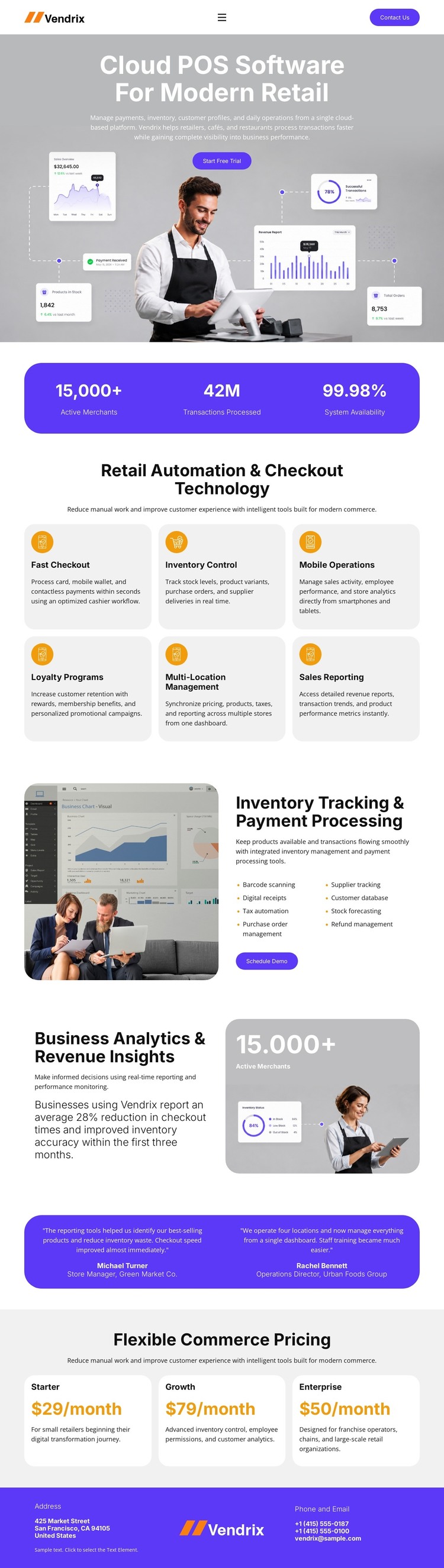
The six capability cards create a useful starting relationship for WordPress-managed product content. Fast Checkout, Inventory Control, Mobile Operations, Loyalty Programs, Multi-Location Management, and Sales Reporting are separate topics, but their repeated card treatment keeps them inside one recognizable product system. The header navigation and compact Get Started action can connect those topics to other page-oriented content without changing the visual character established by the template.
The inventory and payment section provides a more detailed permanent content area. Its dashboard image, explanatory copy, feature list, and Schedule Demo button create a natural place for a product or solution explanation. The analytics section gives business reporting and revenue insights a separate content relationship, pairing a second image panel with its own narrative and metric treatment. Together, these areas can support a site that distinguishes operational software information from analytics-focused material.
Testimonials and pricing add recurring content roles around the product story. Two customer quote blocks supply proof, while Starter, Growth, and Enterprise cards present a structured commercial comparison and a Start Free Trial action. The footer’s address, phone, email, and brand details provide shared site information rather than another product feature. This combination suits a WordPress theme interpretation where permanent product pages and repeatedly updated content can remain within the same purple, white, and navy visual system. The WordPress Plugin can provide a product bridge when WordPress content needs to be edited within the Nicepage environment.
Customize with Nicepage
Open this ready-made template in the WordPress Website Builder and customize it visually in the Nicepage editor. Replace demo content, edit page sections, and adapt the design to your project without rebuilding the template from scratch.
Manage and Edit This Theme in WordPress
Customize and Install the WordPress Theme
Start with this ready-made theme instead of building the WordPress design from scratch. Customize its layout, content, typography, images, sections, and other design elements visually in Nicepage editor, then export and install the WordPress Theme, Plugin, and Pages on your WordPress site. The Nicepage WordPress Plugin lets you continue working with the site after installation.
Edit the Theme Directly in WordPress
After installation, you can edit the WordPress Theme directly in WordPress with the Nicepage WordPress Plugin. Use Site Style to customize site Colors, Fonts, Header, Footer, Blog, and Post Page Templates while working within your WordPress website.
Edit WordPress Pages Visually
Use the Nicepage WordPress Plugin to edit page content directly from the WordPress admin area. Open a WordPress Page with Nicepage and visually change its text, images, sections, and other page elements while continuing to manage the Page through WordPress.
WordPress Content and Theme Integration
Use the customized theme with WordPress Pages, Posts, Blog and Post Templates, menus, widgets, and other CMS-managed content. Shared theme elements such as Colors, Fonts, Header, Footer, Blog, and Post Page Templates can be managed as part of the overall site design, while WordPress provides the CMS environment for managing site content.
This workflow combines a ready-made WordPress Theme with visual customization, direct theme editing in WordPress, and continued content management through the Nicepage WordPress Plugin.





















