Oriental trends in fashion WordPress Theme


A paired-image section gives permanent page content a clear visual entry
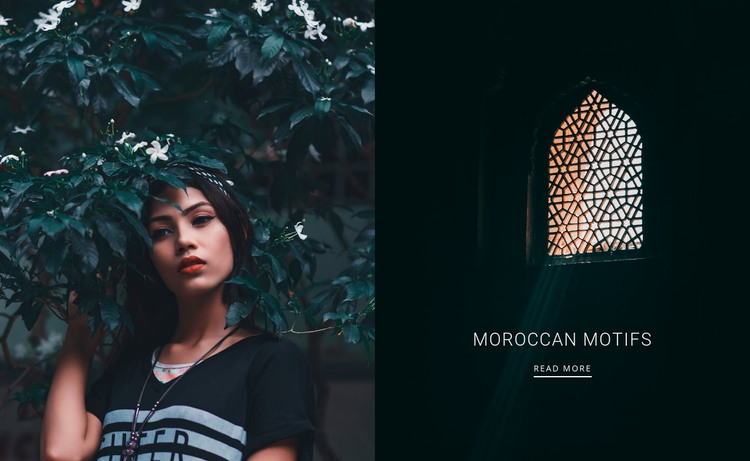
The left portrait and right architectural image create a concise content unit that can sit naturally within a WordPress-managed page. The portrait, surrounded by dense foliage, introduces a human visual presence, while the patterned arched window on the right shifts attention toward a built cultural detail. Since both panels share equal width and meet at a clean vertical divide, the block presents these subjects as related parts of one feature rather than as unrelated cards.
The right panel contains the block’s durable text content. “Moroccan motifs” appears in centered white type over the dark interior, followed by a “read more” link. That arrangement gives the section a stable topic label and a practical route toward fuller material elsewhere on the page or site. The link is the only confirmed interaction, so the section can remain focused on introducing the subject rather than carrying a larger content system inside itself.
Within a WordPress-oriented project, this block can serve as a reusable visual section for a page about cultural travel interests, imagery, or editorial themes. The surrounding page can hold longer descriptions, related destinations, or additional sections, while the paired panels preserve the visual identity of this feature. Its value lies in turning a small amount of page content into a recognizable entry point with both human and architectural imagery.
Customize with Nicepage
Open this ready-made template in the WordPress Website Builder and customize it visually in the Nicepage editor. Replace demo content, edit page sections, and adapt the design to your project without rebuilding the template from scratch.
Edit Template Offline
2. Create a new page or select existing
3. Click Add new block, search for id 53135 and click enter
Edit Template Online
Create Awesome Websites


Free Nicepage Builder
Keywords
Manage and Edit This Theme in WordPress
Customize and Install the WordPress Theme
Start with this ready-made theme instead of building the WordPress design from scratch. Customize its layout, content, typography, images, sections, and other design elements visually in Nicepage editor, then export and install the WordPress Theme, Plugin, and Pages on your WordPress site. The Nicepage WordPress Plugin lets you continue working with the site after installation.
Edit the Theme Directly in WordPress
After installation, you can edit the WordPress Theme directly in WordPress with the Nicepage WordPress Plugin. Use Site Style to customize site Colors, Fonts, Header, Footer, Blog, and Post Page Templates while working within your WordPress website.
Edit WordPress Pages Visually
Use the Nicepage WordPress Plugin to edit page content directly from the WordPress admin area. Open a WordPress Page with Nicepage and visually change its text, images, sections, and other page elements while continuing to manage the Page through WordPress.
WordPress Content and Theme Integration
Use the customized theme with WordPress Pages, Posts, Blog and Post Templates, menus, widgets, and other CMS-managed content. Shared theme elements such as Colors, Fonts, Header, Footer, Blog, and Post Page Templates can be managed as part of the overall site design, while WordPress provides the CMS environment for managing site content.
This workflow combines a ready-made WordPress Theme with visual customization, direct theme editing in WordPress, and continued content management through the Nicepage WordPress Plugin.