Low-impact energy source WordPress Theme


Two Solar Benefit Cards Create Stable Page Content
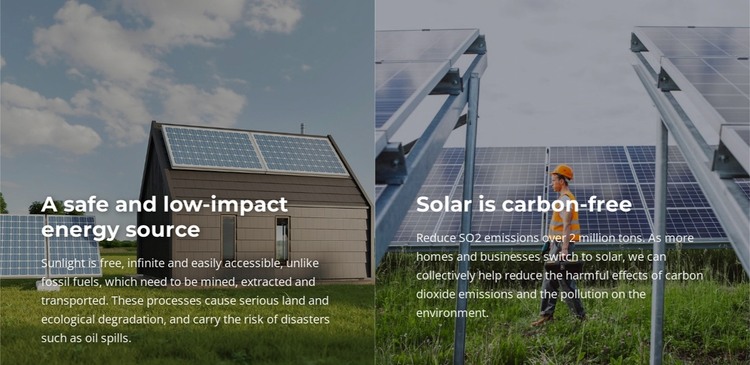
The two repeated panels read naturally as a focused benefits area within a WordPress-managed page. One card explains solar as a safe, low-impact energy source, while the other presents its carbon-free character. Because each idea has its own heading and supporting paragraph, the content can remain easy to review and maintain as a defined page section rather than becoming one undifferentiated text block. The equal-width arrangement also gives both messages the same visual importance.
The content is carried by two photographic backgrounds: rooftop solar on one side and ground-mounted solar on the other. Dark overlays support white text near the lower left, creating a consistent reading pattern that can remain visually stable when the surrounding page content changes. The bold heading and smaller description establish a simple internal hierarchy, while generous spacing keeps the words distinct from the image detail.
In a WordPress-oriented project, this section can hold enduring explanatory content on a services, technology, or sustainability page, with other managed areas providing adjacent information. The wording introduces accessible sunlight, carbon-free energy, and reduced pollution as supporting themes. A sample emissions figure should be treated as replaceable content rather than a confirmed achievement. The section’s repeatable structure makes it practical to revise headings, paragraphs, or images while preserving the comparison between two solar benefits.
Customize with Nicepage
Open this ready-made template in the WordPress Website Builder and customize it visually in the Nicepage editor. Replace demo content, edit page sections, and adapt the design to your project without rebuilding the template from scratch.
Edit Template Offline
2. Create a new page or select existing
3. Click Add new block, search for id 5224138 and click enter
Edit Template Online
Create Awesome Websites


Free Nicepage Builder
Keywords
Manage and Edit This Theme in WordPress
Customize and Install the WordPress Theme
Start with this ready-made theme instead of building the WordPress design from scratch. Customize its layout, content, typography, images, sections, and other design elements visually in Nicepage editor, then export and install the WordPress Theme, Plugin, and Pages on your WordPress site. The Nicepage WordPress Plugin lets you continue working with the site after installation.
Edit the Theme Directly in WordPress
After installation, you can edit the WordPress Theme directly in WordPress with the Nicepage WordPress Plugin. Use Site Style to customize site Colors, Fonts, Header, Footer, Blog, and Post Page Templates while working within your WordPress website.
Edit WordPress Pages Visually
Use the Nicepage WordPress Plugin to edit page content directly from the WordPress admin area. Open a WordPress Page with Nicepage and visually change its text, images, sections, and other page elements while continuing to manage the Page through WordPress.
WordPress Content and Theme Integration
Use the customized theme with WordPress Pages, Posts, Blog and Post Templates, menus, widgets, and other CMS-managed content. Shared theme elements such as Colors, Fonts, Header, Footer, Blog, and Post Page Templates can be managed as part of the overall site design, while WordPress provides the CMS environment for managing site content.
This workflow combines a ready-made WordPress Theme with visual customization, direct theme editing in WordPress, and continued content management through the Nicepage WordPress Plugin.