Great winter holidays WordPress Theme


Stable Editorial Content Around a Featured Iceland Image
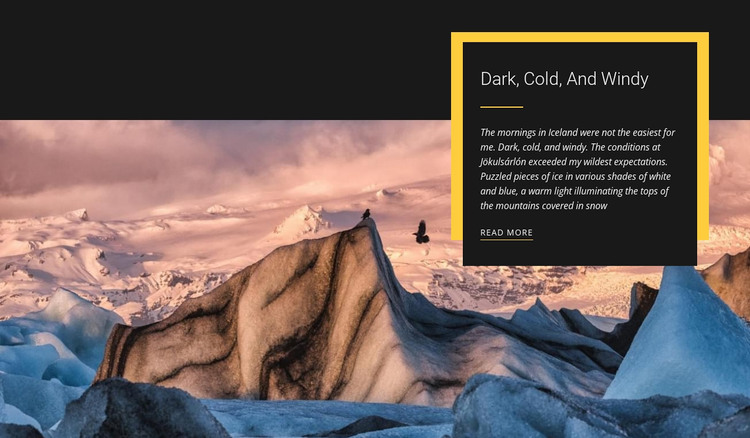
The block reads as durable page content: a featured photograph, a concise editorial explanation, and a link to continue reading. The wide image shows an icy landscape, while the heading “Dark, Cold, And Windy” and paragraph provide the written context through references to Icelandic mornings, Jökulsárlón, and white-and-blue ice. Because the text is grouped in one dark panel, the image and copy can remain visually connected without competing for the same reading space.
In a WordPress-oriented project, this section could occupy a stable photography or travel area on a page, with other content managed around it. The upper-right placement and yellow offset accent preserve a recognizable design pattern that can be reused when related editorial sections need a consistent visual direction. The “Read more” link also gives the section a clear relationship to longer material without requiring the block to contain that material itself. This makes the block suitable as publishable page content within a broader WordPress-managed site, while the surrounding project supplies its other pages, site regions, and content types. The interpretation concerns how this particular image-and-story unit can participate in that environment, not a claim that the section itself is a complete WordPress Theme or that it already contains WordPress Posts, categories, or widgets.
Customize with Nicepage
Open this ready-made template in the WordPress Website Builder and customize it visually in the Nicepage editor. Replace demo content, edit page sections, and adapt the design to your project without rebuilding the template from scratch.
Edit Template Offline
2. Create a new page or select existing
3. Click Add new block, search for id 49987 and click enter
Edit Template Online
Create Awesome Websites


Free Nicepage Builder
Keywords
Manage and Edit This Theme in WordPress
Customize and Install the WordPress Theme
Start with this ready-made theme instead of building the WordPress design from scratch. Customize its layout, content, typography, images, sections, and other design elements visually in Nicepage editor, then export and install the WordPress Theme, Plugin, and Pages on your WordPress site. The Nicepage WordPress Plugin lets you continue working with the site after installation.
Edit the Theme Directly in WordPress
After installation, you can edit the WordPress Theme directly in WordPress with the Nicepage WordPress Plugin. Use Site Style to customize site Colors, Fonts, Header, Footer, Blog, and Post Page Templates while working within your WordPress website.
Edit WordPress Pages Visually
Use the Nicepage WordPress Plugin to edit page content directly from the WordPress admin area. Open a WordPress Page with Nicepage and visually change its text, images, sections, and other page elements while continuing to manage the Page through WordPress.
WordPress Content and Theme Integration
Use the customized theme with WordPress Pages, Posts, Blog and Post Templates, menus, widgets, and other CMS-managed content. Shared theme elements such as Colors, Fonts, Header, Footer, Blog, and Post Page Templates can be managed as part of the overall site design, while WordPress provides the CMS environment for managing site content.
This workflow combines a ready-made WordPress Theme with visual customization, direct theme editing in WordPress, and continued content management through the Nicepage WordPress Plugin.