Western Roads Guide WordPress Theme


Stable Editorial Travel Content Between Portrait and Place
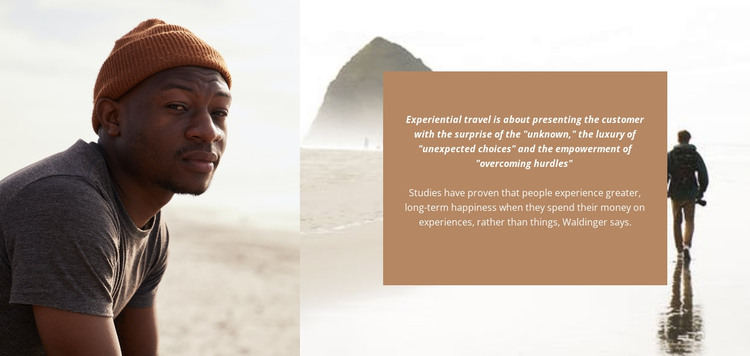
The block reads as permanent editorial content because its main subject is a considered statement about travel, not a changing feed or transactional element. A close portrait of a traveler in a brown knit hat occupies the left side, giving the section a personal point of entry. The right side shows a beach scene with a walking traveler, and the centered brown panel turns that image into a setting for the written message.
The panel’s emphasized statement describes experiential travel through the unknown, unexpected choices, and overcoming hurdles. The supporting paragraph adds a contrasting idea: people may find longer-term happiness in spending on experiences rather than things. The attribution to Waldinger is part of the displayed editorial structure, while the surrounding photographs reinforce the theme without adding unconfirmed destination or business details.
In a WordPress-managed site, this arrangement can serve as a stable section on a travel, hospitality, or editorial page while the broader project manages other content separately. It can introduce a point of view before destination information, follow a visual showcase, or provide a reflective transition between practical sections. The block’s value comes from its durable image-and-text relationship: the portrait humanizes the message, the beach image supplies travel context, and the centered card makes the argument easy to read.
Customize with Nicepage
Open this ready-made template in the WordPress Website Builder and customize it visually in the Nicepage editor. Replace demo content, edit page sections, and adapt the design to your project without rebuilding the template from scratch.
Edit Template Offline
2. Create a new page or select existing
3. Click Add new block, search for id 474123 and click enter
Edit Template Online
Create Awesome Websites


Free Nicepage Builder
Keywords
Manage and Edit This Theme in WordPress
Customize and Install the WordPress Theme
Start with this ready-made theme instead of building the WordPress design from scratch. Customize its layout, content, typography, images, sections, and other design elements visually in Nicepage editor, then export and install the WordPress Theme, Plugin, and Pages on your WordPress site. The Nicepage WordPress Plugin lets you continue working with the site after installation.
Edit the Theme Directly in WordPress
After installation, you can edit the WordPress Theme directly in WordPress with the Nicepage WordPress Plugin. Use Site Style to customize site Colors, Fonts, Header, Footer, Blog, and Post Page Templates while working within your WordPress website.
Edit WordPress Pages Visually
Use the Nicepage WordPress Plugin to edit page content directly from the WordPress admin area. Open a WordPress Page with Nicepage and visually change its text, images, sections, and other page elements while continuing to manage the Page through WordPress.
WordPress Content and Theme Integration
Use the customized theme with WordPress Pages, Posts, Blog and Post Templates, menus, widgets, and other CMS-managed content. Shared theme elements such as Colors, Fonts, Header, Footer, Blog, and Post Page Templates can be managed as part of the overall site design, while WordPress provides the CMS environment for managing site content.
This workflow combines a ready-made WordPress Theme with visual customization, direct theme editing in WordPress, and continued content management through the Nicepage WordPress Plugin.