Travel experts WordPress Theme



Charter Service Information With a Defined WordPress Page Role
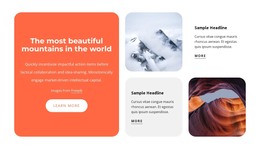
The block’s content reads naturally as stable company or service information: “Choose The Travel Experts” introduces the provider, while the adjacent copy explains what the nationwide charter offering includes. Springfield and Branson provide named service areas, and the 54 to 56 passenger capacity gives the motorcoach description a useful scale. Mentioning restrooms, DVD players, and monitors adds further detail that can help a visitor understand the type of transportation being presented.
For a WordPress-managed page, this makes the section suitable as permanent visual content within a travel or charter project. The left heading area establishes a recognizable topic, supported by the mountain landscape and orange circular accent, while the right column keeps the longer explanation and read-more button together. That organization separates the block’s identity from the surrounding page content, so other areas can handle destinations, inquiries, booking information, or related services.
The button is especially useful as a bridge from summary to fuller service content. It can lead visitors toward a more detailed destination or information area while this section remains concise enough to work alongside other page sections. In a WordPress-oriented project, the block can therefore preserve a consistent presentation of the charter service while the wider site manages additional pages and editable content around it.
Customize with Nicepage
Open this ready-made template in the WordPress Website Builder and customize it visually in the Nicepage editor. Replace demo content, edit page sections, and adapt the design to your project without rebuilding the template from scratch.
Edit Template Offline
2. Create a new page or select existing
3. Click Add new block, search for id 41095 and click enter
Edit Template Online
Create Awesome Websites


Free Nicepage Builder
Keywords
Manage and Edit This Theme in WordPress
Customize and Install the WordPress Theme
Start with this ready-made theme instead of building the WordPress design from scratch. Customize its layout, content, typography, images, sections, and other design elements visually in Nicepage editor, then export and install the WordPress Theme, Plugin, and Pages on your WordPress site. The Nicepage WordPress Plugin lets you continue working with the site after installation.
Edit the Theme Directly in WordPress
After installation, you can edit the WordPress Theme directly in WordPress with the Nicepage WordPress Plugin. Use Site Style to customize site Colors, Fonts, Header, Footer, Blog, and Post Page Templates while working within your WordPress website.
Edit WordPress Pages Visually
Use the Nicepage WordPress Plugin to edit page content directly from the WordPress admin area. Open a WordPress Page with Nicepage and visually change its text, images, sections, and other page elements while continuing to manage the Page through WordPress.
WordPress Content and Theme Integration
Use the customized theme with WordPress Pages, Posts, Blog and Post Templates, menus, widgets, and other CMS-managed content. Shared theme elements such as Colors, Fonts, Header, Footer, Blog, and Post Page Templates can be managed as part of the overall site design, while WordPress provides the CMS environment for managing site content.
This workflow combines a ready-made WordPress Theme with visual customization, direct theme editing in WordPress, and continued content management through the Nicepage WordPress Plugin.