
Desired results in business WordPress Theme


Edit Template Offline
2. Create new page and search for id 32181
Edit Template Online
Create Awesome Websites


Free Nicepage Builder
Keywords
Mission-Led Pages and Reusable Agency Content
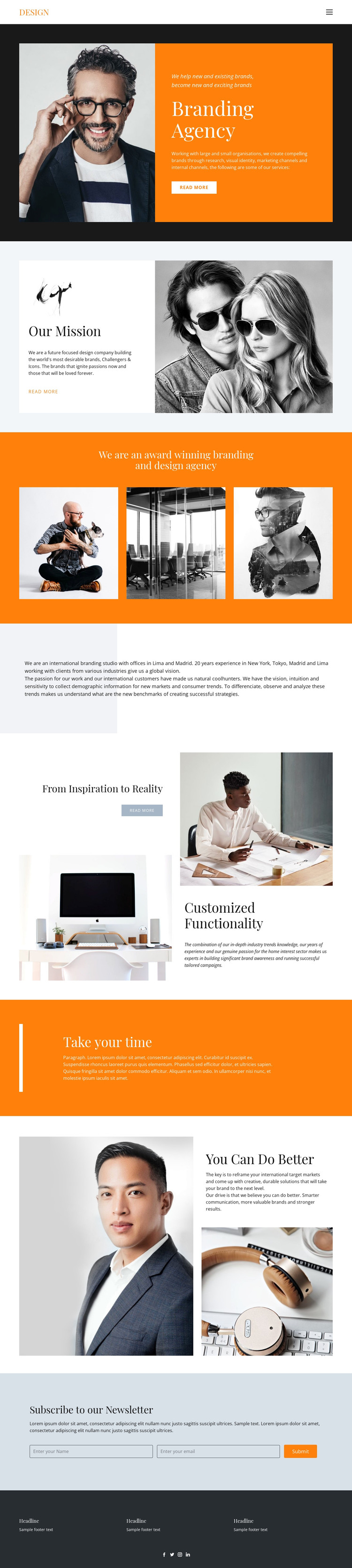
The page-oriented content is well suited to a WordPress-managed interpretation because its main subjects are already separated into readable editorial areas. The Branding Agency introduction and Our Mission section can anchor permanent page content, while the capability references provide distinct material for explaining brand research, visual identity, marketing channels, and internal channels. The alternating photography and text compositions help those areas remain connected visually without forcing every subject into the same content format.
The three-image showcase adds a visual content zone that can support project highlights or selected work when the agency replaces the demonstration imagery with its own material. The From Inspiration to Reality section contributes a second relationship: it shows how an idea can be discussed alongside customized functionality and campaign-oriented content. Around these central areas, Lima and Madrid provide office context, and the dark footer groups social access through Facebook, Twitter, Instagram, and LinkedIn. The closing newsletter section is different in role, using name and email inputs to support subscriber communication. Together, these page and content areas give a WordPress theme a practical editorial foundation while preserving the design’s bold agency profile.
Customize with Nicepage
Open this ready-made template in the WordPress Website Builder and customize it visually in the Nicepage editor. Replace demo content, edit page sections, and adapt the design to your project without rebuilding the template from scratch.
Manage and Edit This Theme in WordPress
Customize and Install the WordPress Theme
Start with this ready-made theme instead of building the WordPress design from scratch. Customize its layout, content, typography, images, sections, and other design elements visually in Nicepage editor, then export and install the WordPress Theme, Plugin, and Pages on your WordPress site. The Nicepage WordPress Plugin lets you continue working with the site after installation.
Edit the Theme Directly in WordPress
After installation, you can edit the WordPress Theme directly in WordPress with the Nicepage WordPress Plugin. Use Site Style to customize site Colors, Fonts, Header, Footer, Blog, and Post Page Templates while working within your WordPress website.
Edit WordPress Pages Visually
Use the Nicepage WordPress Plugin to edit page content directly from the WordPress admin area. Open a WordPress Page with Nicepage and visually change its text, images, sections, and other page elements while continuing to manage the Page through WordPress.
WordPress Content and Theme Integration
Use the customized theme with WordPress Pages, Posts, Blog and Post Templates, menus, widgets, and other CMS-managed content. Shared theme elements such as Colors, Fonts, Header, Footer, Blog, and Post Page Templates can be managed as part of the overall site design, while WordPress provides the CMS environment for managing site content.
This workflow combines a ready-made WordPress Theme with visual customization, direct theme editing in WordPress, and continued content management through the Nicepage WordPress Plugin.





















