
Limited-edition photography WordPress Theme


Edit Template Offline
2. Create new page and search for id 31342
Edit Template Online
Create Awesome Websites


Free Nicepage Builder
Keywords
Project Content Fits a Page-Oriented Portfolio Theme
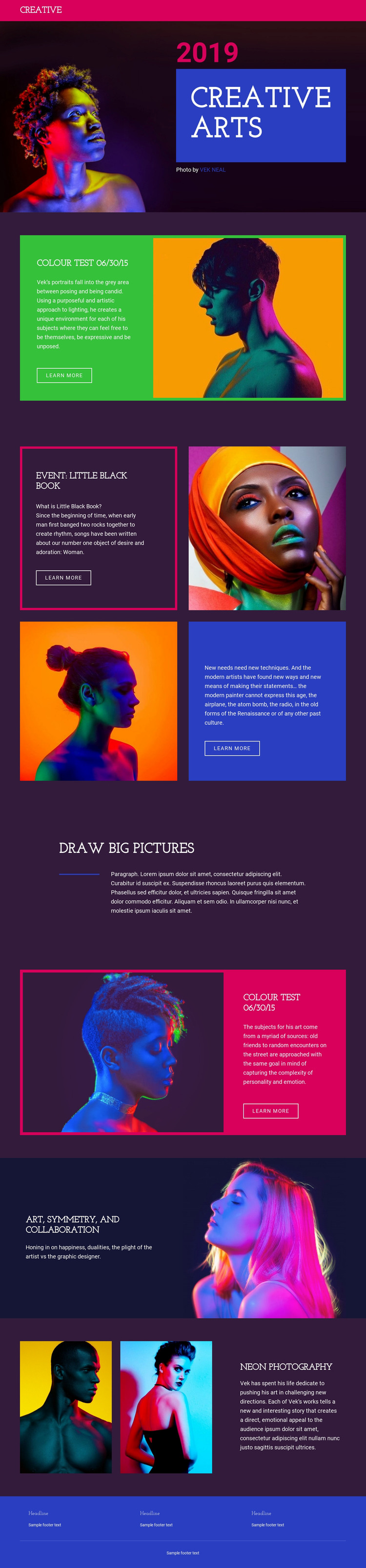
The page-oriented content is well suited to a WordPress-managed photography project because each major visual area has a recognizable editorial role. The Creative Arts hero can introduce the portfolio’s subject with a vivid portrait, the 2019 date, and the VEK NEAL credit, while COLOUR TEST 06/30/15 provides a featured project format built from an image, descriptive text, and a learn more action. These are distinct content areas rather than one undifferentiated image sequence.
EVENT: LITTLE BLACK BOOK supplies two repeatable project features with alternating alignment, a useful pattern for presenting related photographic work while preserving the same visual character. The second colour-test section demonstrates how a recurring project treatment can return later in the page with a different image and color-panel relationship. Draw big pictures can serve as an editorial statement between project entries, while ART, SYMMETRY, AND COLLABORATION and Neon photography add broader artistic and image-led content. The colored navigation and blue three-column footer provide shared site elements around those page areas. If the project later includes regularly updated editorial material, the existing visual system could frame it, but no blog or post structure is claimed as already present. The theme’s main strength is its clear separation of permanent portfolio content into visually recognizable sections.
Customize with Nicepage
Open this ready-made template in the WordPress Website Builder and customize it visually in the Nicepage editor. Replace demo content, edit page sections, and adapt the design to your project without rebuilding the template from scratch.
Manage and Edit This Theme in WordPress
Customize and Install the WordPress Theme
Start with this ready-made theme instead of building the WordPress design from scratch. Customize its layout, content, typography, images, sections, and other design elements visually in Nicepage editor, then export and install the WordPress Theme, Plugin, and Pages on your WordPress site. The Nicepage WordPress Plugin lets you continue working with the site after installation.
Edit the Theme Directly in WordPress
After installation, you can edit the WordPress Theme directly in WordPress with the Nicepage WordPress Plugin. Use Site Style to customize site Colors, Fonts, Header, Footer, Blog, and Post Page Templates while working within your WordPress website.
Edit WordPress Pages Visually
Use the Nicepage WordPress Plugin to edit page content directly from the WordPress admin area. Open a WordPress Page with Nicepage and visually change its text, images, sections, and other page elements while continuing to manage the Page through WordPress.
WordPress Content and Theme Integration
Use the customized theme with WordPress Pages, Posts, Blog and Post Templates, menus, widgets, and other CMS-managed content. Shared theme elements such as Colors, Fonts, Header, Footer, Blog, and Post Page Templates can be managed as part of the overall site design, while WordPress provides the CMS environment for managing site content.
This workflow combines a ready-made WordPress Theme with visual customization, direct theme editing in WordPress, and continued content management through the Nicepage WordPress Plugin.





















