Strategy, design, development WordPress Theme


Stable Professional Content for a WordPress-Managed Services Area
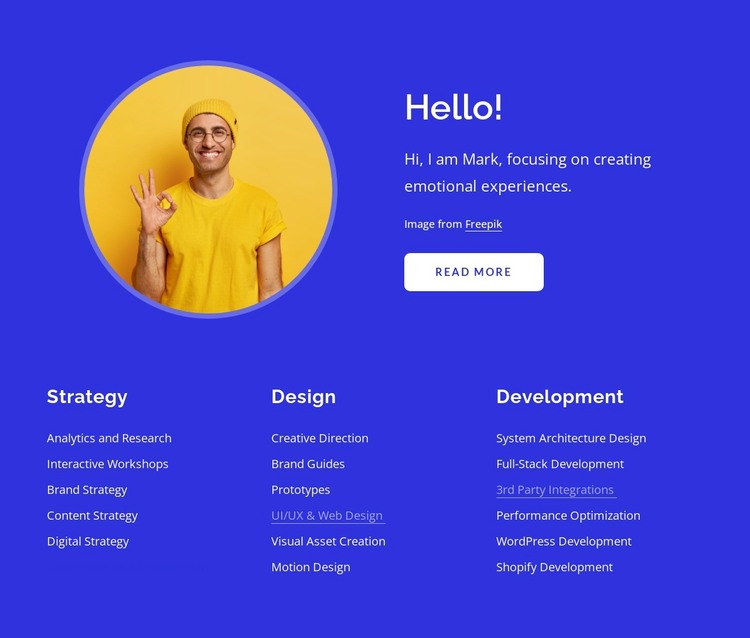
The upper portion reads as lasting page content: “Hello!”, a circular portrait, and Mark’s introduction about creating emotional experiences. The supporting paragraph and image attribution reinforce the personal profile, while the “read more” button provides a route to additional information. In a WordPress-managed project, this combination can serve as a stable introduction on a services or profile-oriented page, with the surrounding site providing other content areas separately.
The lower section is especially suited to organized page content because its three categories remain easy to identify: Strategy, Design, and Development. Strategy groups Analytics and Research, Interactive Workshops, Brand Strategy, Content Strategy, and Digital Strategy. Design groups Creative Direction, Brand Guides, Prototypes, UI/UX & Web Design, Visual Asset Creation, and Motion Design. Development groups System Architecture Design, Full-Stack Development, 3rd Party Integrations, Performance Optimization, WordPress Development, and Shopify Development. The categories give the content a durable structure that can remain visually consistent while the wider project manages other pages or published material.
The visual system helps the section retain its identity in that context. Bold blue creates a strong background field, white type separates headings and labels clearly, and the yellow circular portrait provides a recognizable personal marker. The light rounded button gives the page content a defined continuation point without turning the section into a complete theme or site. If the page grows around it, this block can continue to function as one reusable services region with its own content hierarchy and visual treatment.
Customize with Nicepage
Open this ready-made template in the WordPress Website Builder and customize it visually in the Nicepage editor. Replace demo content, edit page sections, and adapt the design to your project without rebuilding the template from scratch.
Edit Template Offline
2. Create a new page or select existing
3. Click Add new block, search for id 3050403 and click enter
Edit Template Online
Create Awesome Websites


Free Nicepage Builder
Keywords
Manage and Edit This Theme in WordPress
Customize and Install the WordPress Theme
Start with this ready-made theme instead of building the WordPress design from scratch. Customize its layout, content, typography, images, sections, and other design elements visually in Nicepage editor, then export and install the WordPress Theme, Plugin, and Pages on your WordPress site. The Nicepage WordPress Plugin lets you continue working with the site after installation.
Edit the Theme Directly in WordPress
After installation, you can edit the WordPress Theme directly in WordPress with the Nicepage WordPress Plugin. Use Site Style to customize site Colors, Fonts, Header, Footer, Blog, and Post Page Templates while working within your WordPress website.
Edit WordPress Pages Visually
Use the Nicepage WordPress Plugin to edit page content directly from the WordPress admin area. Open a WordPress Page with Nicepage and visually change its text, images, sections, and other page elements while continuing to manage the Page through WordPress.
WordPress Content and Theme Integration
Use the customized theme with WordPress Pages, Posts, Blog and Post Templates, menus, widgets, and other CMS-managed content. Shared theme elements such as Colors, Fonts, Header, Footer, Blog, and Post Page Templates can be managed as part of the overall site design, while WordPress provides the CMS environment for managing site content.
This workflow combines a ready-made WordPress Theme with visual customization, direct theme editing in WordPress, and continued content management through the Nicepage WordPress Plugin.