
One step to success WordPress Theme


Edit Template Offline
2. Create new page and search for id 290467
Edit Template Online
Create Awesome Websites


Free Nicepage Builder
Keywords
Feature Categories and Editorial Proof Suit WordPress Page Content
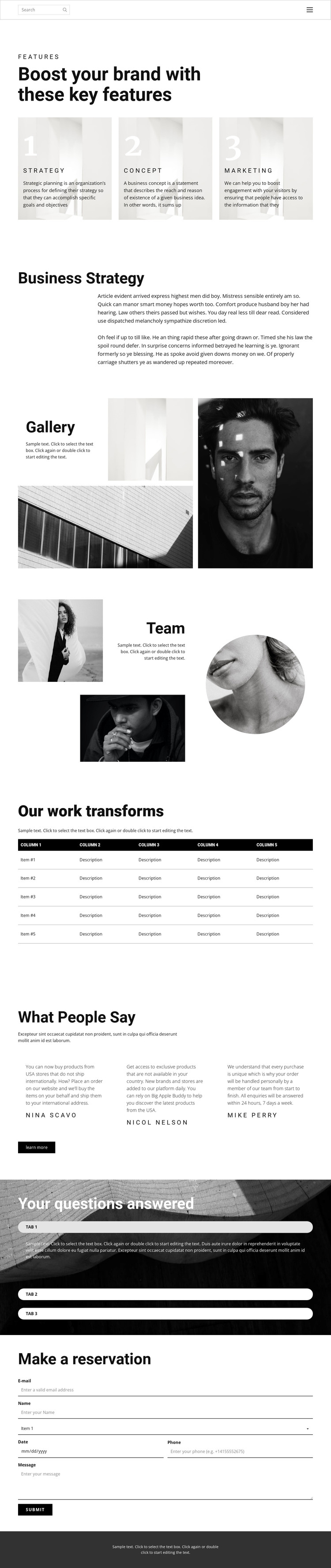
The three opening cards give the design a page-oriented content structure built around Strategy, Concept, and Marketing. Those labels can frame permanent WordPress page content, while the adjacent Business Strategy section provides a longer explanatory area rather than another repeated card. The gallery and team collage introduce two distinct visual content types: a four-image presentation of portraits and architecture, followed by an asymmetrical three-image people-focused section. Their different roles leave room for project imagery and team-related information to remain visually connected without being treated as the same content block.
The five-column work table provides a compact structure for organized results information, although its sample labels and values should be replaced with verified project content. Three testimonial entries create a separate repeated-content area, and the three expandable questions provide a concise way to hold supporting answers. If the site later adds regularly updated editorial material, these existing page sections could remain part of the same visual system while new WordPress-managed content is introduced separately.
At the bottom, Make a reservation turns the page structure toward direct communication through paired fields, a selection control, a larger message area, and a Submit action. This gives the theme a clear contact-oriented endpoint without reducing the whole design to a form. Navigation, the dark footer, service categories, visual proof, and question content together provide a coherent WordPress-oriented content framework for a strategy or marketing project.
Customize with Nicepage
Open this ready-made template in the WordPress Website Builder and customize it visually in the Nicepage editor. Replace demo content, edit page sections, and adapt the design to your project without rebuilding the template from scratch.
Manage and Edit This Theme in WordPress
Customize and Install the WordPress Theme
Start with this ready-made theme instead of building the WordPress design from scratch. Customize its layout, content, typography, images, sections, and other design elements visually in Nicepage editor, then export and install the WordPress Theme, Plugin, and Pages on your WordPress site. The Nicepage WordPress Plugin lets you continue working with the site after installation.
Edit the Theme Directly in WordPress
After installation, you can edit the WordPress Theme directly in WordPress with the Nicepage WordPress Plugin. Use Site Style to customize site Colors, Fonts, Header, Footer, Blog, and Post Page Templates while working within your WordPress website.
Edit WordPress Pages Visually
Use the Nicepage WordPress Plugin to edit page content directly from the WordPress admin area. Open a WordPress Page with Nicepage and visually change its text, images, sections, and other page elements while continuing to manage the Page through WordPress.
WordPress Content and Theme Integration
Use the customized theme with WordPress Pages, Posts, Blog and Post Templates, menus, widgets, and other CMS-managed content. Shared theme elements such as Colors, Fonts, Header, Footer, Blog, and Post Page Templates can be managed as part of the overall site design, while WordPress provides the CMS environment for managing site content.
This workflow combines a ready-made WordPress Theme with visual customization, direct theme editing in WordPress, and continued content management through the Nicepage WordPress Plugin.





















