Infographics in simple words WordPress Theme


Publishable Page Content Built Around One Highlighted Metric
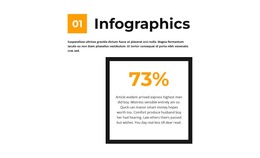
The heading and introductory paragraph give this block the character of stable informational content rather than a feed of changing items. The orange 01 marker identifies the section, and the “Infographics” title establishes its subject before the centered card presents the sample 73% value. Within the card, the thick black rectangular border creates a contained content area and the paragraph beneath the percentage provides space for explanation. Together, these relationships form a concise statistics section for a managed page.
In a WordPress-oriented project, the block can remain a reusable visual region on a page while other content areas handle broader editorial or site functions. Its content model is intentionally focused: one heading, one introduction, one highlighted metric, and one supporting explanation. The white background and black typography make the section adaptable around other page content, while the orange marker and percentage provide a recognizable accent without requiring a site-wide visual system.
The displayed 73% and sample paragraphs should be treated as editable demonstration content. Replacing them with the appropriate metric and explanation preserves the block’s purpose without turning the sample into a business claim. Because the interaction is static, the section is suited to straightforward page presentation: visitors read the introduction, move to the framed value, and then use the supporting text to understand its context. The broader WordPress-managed page supplies the surrounding structure.
Customize with Nicepage
Open this ready-made template in the WordPress Website Builder and customize it visually in the Nicepage editor. Replace demo content, edit page sections, and adapt the design to your project without rebuilding the template from scratch.
Edit Template Offline
2. Create a new page or select existing
3. Click Add new block, search for id 2552516 and click enter
Edit Template Online
Create Awesome Websites


Free Nicepage Builder
Keywords
Manage and Edit This Theme in WordPress
Customize and Install the WordPress Theme
Start with this ready-made theme instead of building the WordPress design from scratch. Customize its layout, content, typography, images, sections, and other design elements visually in Nicepage editor, then export and install the WordPress Theme, Plugin, and Pages on your WordPress site. The Nicepage WordPress Plugin lets you continue working with the site after installation.
Edit the Theme Directly in WordPress
After installation, you can edit the WordPress Theme directly in WordPress with the Nicepage WordPress Plugin. Use Site Style to customize site Colors, Fonts, Header, Footer, Blog, and Post Page Templates while working within your WordPress website.
Edit WordPress Pages Visually
Use the Nicepage WordPress Plugin to edit page content directly from the WordPress admin area. Open a WordPress Page with Nicepage and visually change its text, images, sections, and other page elements while continuing to manage the Page through WordPress.
WordPress Content and Theme Integration
Use the customized theme with WordPress Pages, Posts, Blog and Post Templates, menus, widgets, and other CMS-managed content. Shared theme elements such as Colors, Fonts, Header, Footer, Blog, and Post Page Templates can be managed as part of the overall site design, while WordPress provides the CMS environment for managing site content.
This workflow combines a ready-made WordPress Theme with visual customization, direct theme editing in WordPress, and continued content management through the Nicepage WordPress Plugin.