
Iconic ideas of art WordPress Theme


Edit Template Offline
2. Create new page and search for id 23071
Edit Template Online
Create Awesome Websites


Free Nicepage Builder
Keywords
Page content and recurring agency sections fit a WordPress theme direction
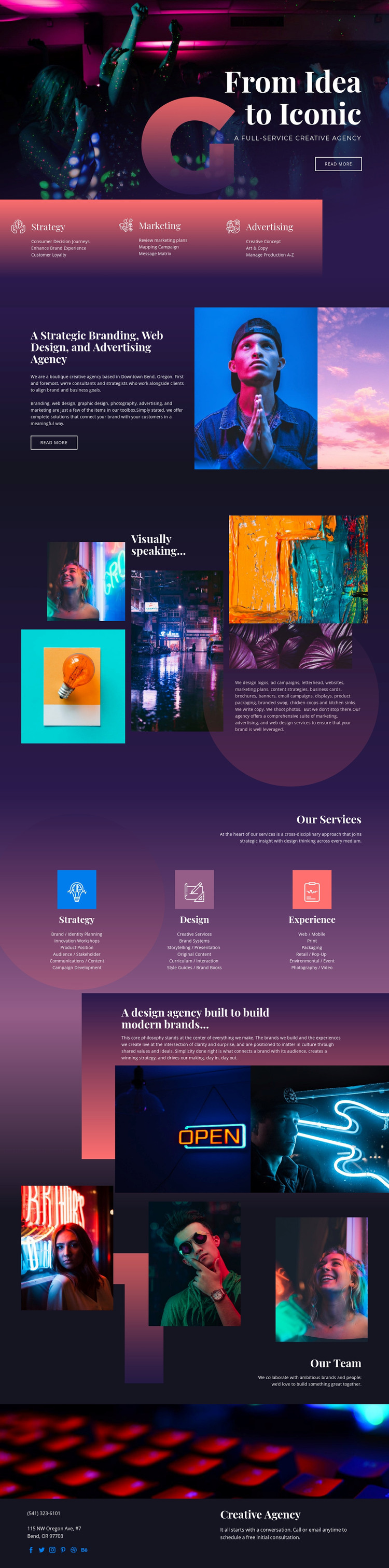
The design separates several kinds of page content that a WordPress project may need to present and expand. The hero and the first service panels provide the core agency introduction, with Strategy, Marketing, and Advertising visible before the longer positioning statement. The later Strategy, Design, and Experience columns offer more detailed service material, creating a useful relationship between overview content and discipline-focused information without claiming that WordPress content types already exist in the template.
The five-image collage and the three team photographs support recurring visual content with different editorial roles. The collage can represent the agency’s creative output and art direction, while the team section presents the people and collaborative character behind the services. The philosophy statement adds a page-oriented narrative layer, and the social links provide external destinations within the shared visual system. These areas can be maintained as related agency content rather than treated as unrelated blocks.
The final contact section gives the theme a practical closing region with contact details and an invitation to schedule an initial consultation. A WordPress project could continue the same colors, typography, image treatment, and service hierarchy as content grows. The design’s value for this interpretation comes from its clear permanent page areas and repeatable visual direction, not from an unsupported claim about existing posts, categories, or blog structures.
Customize with Nicepage
Open this ready-made template in the WordPress Website Builder and customize it visually in the Nicepage editor. Replace demo content, edit page sections, and adapt the design to your project without rebuilding the template from scratch.
Manage and Edit This Theme in WordPress
Customize and Install the WordPress Theme
Start with this ready-made theme instead of building the WordPress design from scratch. Customize its layout, content, typography, images, sections, and other design elements visually in Nicepage editor, then export and install the WordPress Theme, Plugin, and Pages on your WordPress site. The Nicepage WordPress Plugin lets you continue working with the site after installation.
Edit the Theme Directly in WordPress
After installation, you can edit the WordPress Theme directly in WordPress with the Nicepage WordPress Plugin. Use Site Style to customize site Colors, Fonts, Header, Footer, Blog, and Post Page Templates while working within your WordPress website.
Edit WordPress Pages Visually
Use the Nicepage WordPress Plugin to edit page content directly from the WordPress admin area. Open a WordPress Page with Nicepage and visually change its text, images, sections, and other page elements while continuing to manage the Page through WordPress.
WordPress Content and Theme Integration
Use the customized theme with WordPress Pages, Posts, Blog and Post Templates, menus, widgets, and other CMS-managed content. Shared theme elements such as Colors, Fonts, Header, Footer, Blog, and Post Page Templates can be managed as part of the overall site design, while WordPress provides the CMS environment for managing site content.
This workflow combines a ready-made WordPress Theme with visual customization, direct theme editing in WordPress, and continued content management through the Nicepage WordPress Plugin.





















