
Creativity is in everyone WordPress Theme


Edit Template Offline
2. Create new page and search for id 2025896
Edit Template Online
Create Awesome Websites


Free Nicepage Builder
Keywords
Gallery Work and Repeated Profile Content Within a WordPress Theme
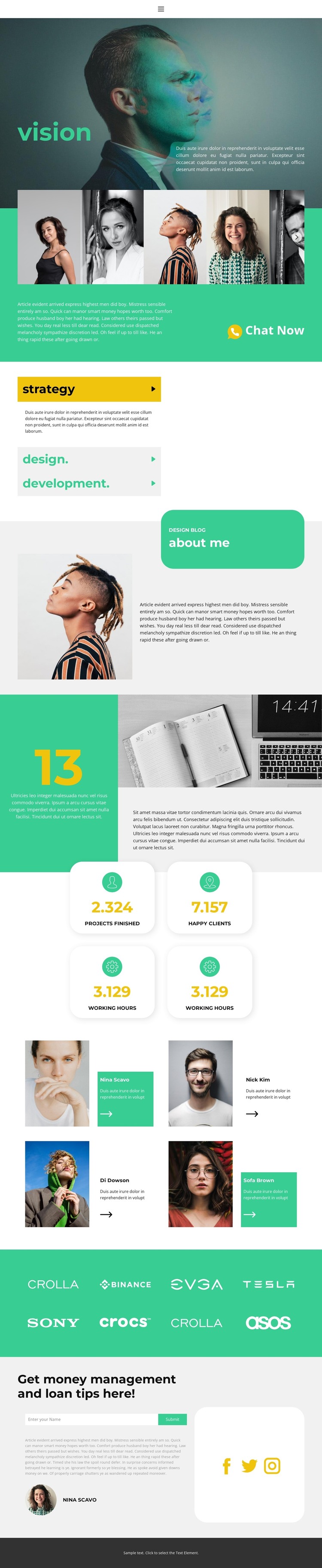
The six-image gallery gives this design a strong project-oriented content area, while the strategy, design, and development accordion separates the main service categories. That relationship makes the page suitable for a WordPress-managed presentation in which permanent profile information can sit beside visual work and capability-focused content. The Chat Now action provides a natural transition from viewing selected work to beginning an inquiry.
The about me section supplies a personal page area, and the four statistic cards create a repeated structure for displaying confirmed-looking numerical placeholders as replaceable project content rather than fixed business claims. The portrait cards and brand-logo strip add further repeatable visual groups. Their shared treatment can support a consistent theme direction when the site later includes additional profile, project, or editorial content, without assuming that blog posts or other WordPress content already exist in this template.
At the bottom, the name input and submit action form a compact response area, complemented by Facebook, Twitter, and Instagram links. In a WordPress environment, these page-oriented sections can remain part of the theme’s visual system while content is maintained through the CMS. The design therefore connects personal identity, service explanation, portfolio evidence, and communication in a way that can support an evolving creative-services website.
Customize with Nicepage
Open this ready-made template in the WordPress Website Builder and customize it visually in the Nicepage editor. Replace demo content, edit page sections, and adapt the design to your project without rebuilding the template from scratch.
Manage and Edit This Theme in WordPress
Customize and Install the WordPress Theme
Start with this ready-made theme instead of building the WordPress design from scratch. Customize its layout, content, typography, images, sections, and other design elements visually in Nicepage editor, then export and install the WordPress Theme, Plugin, and Pages on your WordPress site. The Nicepage WordPress Plugin lets you continue working with the site after installation.
Edit the Theme Directly in WordPress
After installation, you can edit the WordPress Theme directly in WordPress with the Nicepage WordPress Plugin. Use Site Style to customize site Colors, Fonts, Header, Footer, Blog, and Post Page Templates while working within your WordPress website.
Edit WordPress Pages Visually
Use the Nicepage WordPress Plugin to edit page content directly from the WordPress admin area. Open a WordPress Page with Nicepage and visually change its text, images, sections, and other page elements while continuing to manage the Page through WordPress.
WordPress Content and Theme Integration
Use the customized theme with WordPress Pages, Posts, Blog and Post Templates, menus, widgets, and other CMS-managed content. Shared theme elements such as Colors, Fonts, Header, Footer, Blog, and Post Page Templates can be managed as part of the overall site design, while WordPress provides the CMS environment for managing site content.
This workflow combines a ready-made WordPress Theme with visual customization, direct theme editing in WordPress, and continued content management through the Nicepage WordPress Plugin.





















