Photos and contacts WordPress Theme


A Centered Contact Stack for WordPress Page Content
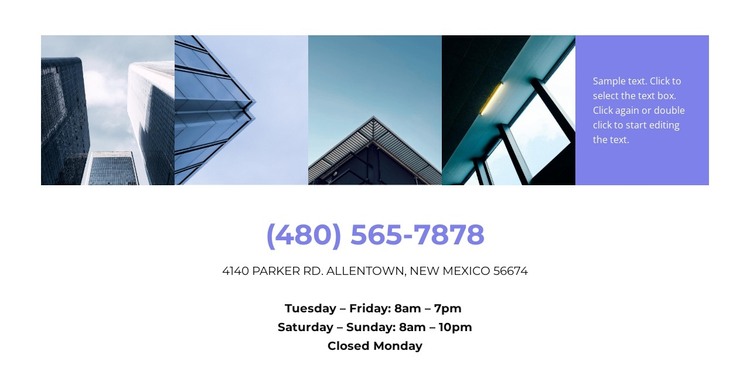
The section’s main content relationship is between an image-led introduction and a practical contact-information stack. Four architectural photographs run across the top as narrow visual panels, while a fifth lavender panel carries supporting placeholder copy. This arrangement gives the contact area a recognizable visual entry point before visitors reach the centered phone number, address, and schedule below.
The lower stack is organized for quick reference. The displayed phone number receives the strongest emphasis through its large purple treatment. The street address follows in uppercase text, and the hours are separated into Tuesday–Friday, Saturday–Sunday, and closed Monday details. These relationships make the section suitable for stable page content in a WordPress-oriented project: the visual arrangement explains where the contact area sits, while the text stack keeps location and availability readable.
Within a WordPress-managed page, this block can serve as a reusable contact region surrounded by other content areas such as project information, services, or a separate inquiry element. Its static interaction keeps the section focused on presenting information rather than collecting a submission or revealing hidden content. The displayed phone, address, and schedule can be replaced with the project’s own details while preserving the five-part image-and-panel introduction and the centered hierarchy of the contact section.
Customize with Nicepage
Open this ready-made template in the WordPress Website Builder and customize it visually in the Nicepage editor. Replace demo content, edit page sections, and adapt the design to your project without rebuilding the template from scratch.
Edit Template Offline
2. Create a new page or select existing
3. Click Add new block, search for id 1790104 and click enter
Edit Template Online
Create Awesome Websites


Free Nicepage Builder
Keywords
Manage and Edit This Theme in WordPress
Customize and Install the WordPress Theme
Start with this ready-made theme instead of building the WordPress design from scratch. Customize its layout, content, typography, images, sections, and other design elements visually in Nicepage editor, then export and install the WordPress Theme, Plugin, and Pages on your WordPress site. The Nicepage WordPress Plugin lets you continue working with the site after installation.
Edit the Theme Directly in WordPress
After installation, you can edit the WordPress Theme directly in WordPress with the Nicepage WordPress Plugin. Use Site Style to customize site Colors, Fonts, Header, Footer, Blog, and Post Page Templates while working within your WordPress website.
Edit WordPress Pages Visually
Use the Nicepage WordPress Plugin to edit page content directly from the WordPress admin area. Open a WordPress Page with Nicepage and visually change its text, images, sections, and other page elements while continuing to manage the Page through WordPress.
WordPress Content and Theme Integration
Use the customized theme with WordPress Pages, Posts, Blog and Post Templates, menus, widgets, and other CMS-managed content. Shared theme elements such as Colors, Fonts, Header, Footer, Blog, and Post Page Templates can be managed as part of the overall site design, while WordPress provides the CMS environment for managing site content.
This workflow combines a ready-made WordPress Theme with visual customization, direct theme editing in WordPress, and continued content management through the Nicepage WordPress Plugin.