Successful eco-design WordPress Theme


Edit Template Offline
2. Create new page and search for id 1558363
Edit Template Online
Create Awesome Websites


Free Nicepage Builder
Keywords
Studio Content Areas Translate Into Organized WordPress Pages
The design separates permanent studio information into recognizable content areas. The hero and brand-positioning statements can establish the studio’s point of view, while the four capability cards provide a compact way to present Design, Programs, Development, and Lookbooks. This gives a WordPress-managed project a clear set of page-oriented subjects without claiming that specific WordPress Pages or Posts already exist in the template.
The About Us grid offers another useful relationship between content and navigation. About Us, What We Do, How We Work, and Contact Us are presented as four distinct information pathways beside a large image, making them suitable subjects for structured page content or linked sections. The three alternating offering rows then provide a visual pattern for Business Card Design, Logo Branding, and Brand Identity. If the studio later publishes project stories or updates, those additions could be interpreted around this established service and portfolio direction rather than forcing a new visual language.
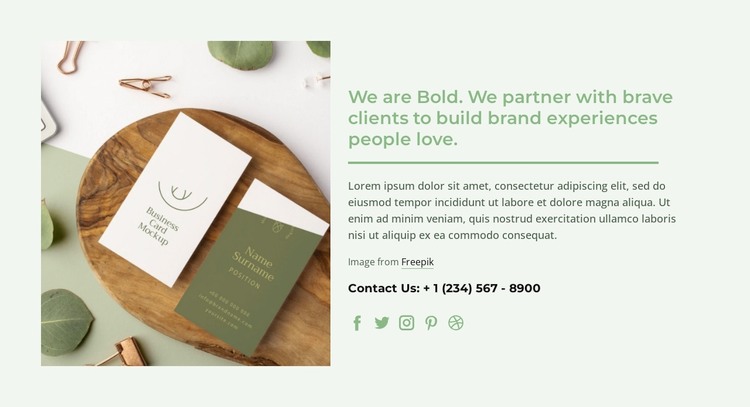
The eco-friendly design guide adds a focused editorial subject, while the closing section combines the partnership statement, contact line, and links to Facebook, Twitter, Instagram, Pinterest, and Dribbble. These elements give the theme both enduring studio content and practical communication access. Nicepage’s WordPress Plugin is an optional bridge for continuing visual work with WordPress-managed content, but the template-specific value comes from how its capability groups, information cards, offering rows, and contact region already divide the studio story into manageable content areas.
Customize with Nicepage
Open this ready-made template in the WordPress Website Builder and customize it visually in the Nicepage editor. Replace demo content, edit page sections, and adapt the design to your project without rebuilding the template from scratch.
Manage and Edit This Theme in WordPress
Customize and Install the WordPress Theme
Start with this ready-made theme instead of building the WordPress design from scratch. Customize its layout, content, typography, images, sections, and other design elements visually in Nicepage editor, then export and install the WordPress Theme, Plugin, and Pages on your WordPress site. The Nicepage WordPress Plugin lets you continue working with the site after installation.
Edit the Theme Directly in WordPress
After installation, you can edit the WordPress Theme directly in WordPress with the Nicepage WordPress Plugin. Use Site Style to customize site Colors, Fonts, Header, Footer, Blog, and Post Page Templates while working within your WordPress website.
Edit WordPress Pages Visually
Use the Nicepage WordPress Plugin to edit page content directly from the WordPress admin area. Open a WordPress Page with Nicepage and visually change its text, images, sections, and other page elements while continuing to manage the Page through WordPress.
WordPress Content and Theme Integration
Use the customized theme with WordPress Pages, Posts, Blog and Post Templates, menus, widgets, and other CMS-managed content. Shared theme elements such as Colors, Fonts, Header, Footer, Blog, and Post Page Templates can be managed as part of the overall site design, while WordPress provides the CMS environment for managing site content.
This workflow combines a ready-made WordPress Theme with visual customization, direct theme editing in WordPress, and continued content management through the Nicepage WordPress Plugin.