
Help in organizing a business WordPress Theme


Edit Template Offline
2. Create new page and search for id 14162
Edit Template Online
Create Awesome Websites


Free Nicepage Builder
Keywords
Feature Cards and Project Imagery Give the Theme Editorial Content Paths
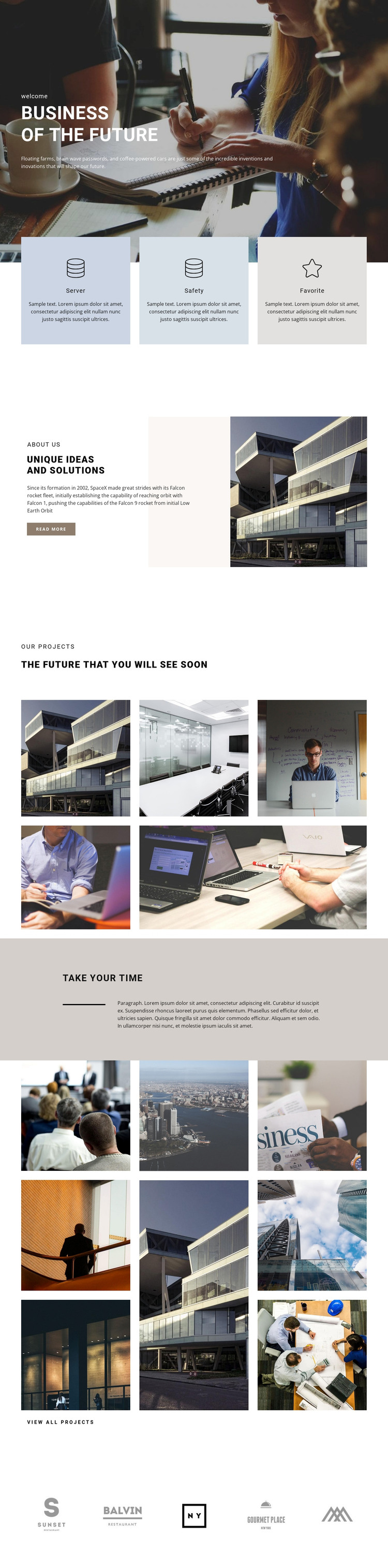
The page’s three labeled panels create a natural set of permanent content areas for a WordPress-managed business presentation. Server, Safety, and Favorite are not presented as a single block of undifferentiated copy; each has its own circular icon, pastel surface, label, and description. That repeated structure can accommodate separate solution or capability explanations while keeping the visual treatment consistent across the page.
The “Unique Ideas and solutions” section adds page-oriented context beside an architectural photograph and a read more action. It can introduce the organization’s approach before visitors reach the “Our Projects” area, where five photographic tiles establish a concise visual record of project work. The second gallery, placed after the “Take your time” interlude, expands that project emphasis with eight images in three vertical columns and a view all projects label.
This progression also leaves room for regularly updated content to sit alongside the more permanent feature and about sections without changing the design’s central character. The final row of five brand-like marks acts as a shared visual sign-off for the page. In a WordPress theme, the distinction between explanatory content, project presentation, and identity elements makes the layout easier to extend while preserving a coherent editorial direction.
Customize with Nicepage
Open this ready-made template in the WordPress Website Builder and customize it visually in the Nicepage editor. Replace demo content, edit page sections, and adapt the design to your project without rebuilding the template from scratch.
Manage and Edit This Theme in WordPress
Customize and Install the WordPress Theme
Start with this ready-made theme instead of building the WordPress design from scratch. Customize its layout, content, typography, images, sections, and other design elements visually in Nicepage editor, then export and install the WordPress Theme, Plugin, and Pages on your WordPress site. The Nicepage WordPress Plugin lets you continue working with the site after installation.
Edit the Theme Directly in WordPress
After installation, you can edit the WordPress Theme directly in WordPress with the Nicepage WordPress Plugin. Use Site Style to customize site Colors, Fonts, Header, Footer, Blog, and Post Page Templates while working within your WordPress website.
Edit WordPress Pages Visually
Use the Nicepage WordPress Plugin to edit page content directly from the WordPress admin area. Open a WordPress Page with Nicepage and visually change its text, images, sections, and other page elements while continuing to manage the Page through WordPress.
WordPress Content and Theme Integration
Use the customized theme with WordPress Pages, Posts, Blog and Post Templates, menus, widgets, and other CMS-managed content. Shared theme elements such as Colors, Fonts, Header, Footer, Blog, and Post Page Templates can be managed as part of the overall site design, while WordPress provides the CMS environment for managing site content.
This workflow combines a ready-made WordPress Theme with visual customization, direct theme editing in WordPress, and continued content management through the Nicepage WordPress Plugin.





















