
We are young business agency WordPress Theme


Edit Template Offline
2. Create new page and search for id 12649
Edit Template Online
Create Awesome Websites


Free Nicepage Builder
Keywords
Project Images and Repeated Cards Support Managed WordPress Content
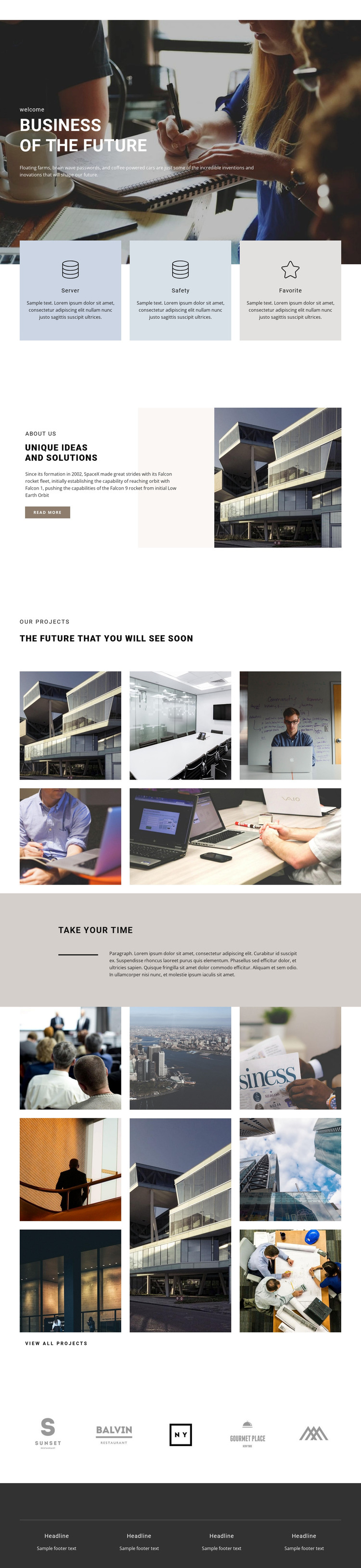
The two project mosaics give the design its strongest publishable content rhythm. The first contains five images beneath the “Our Projects” and future-focused showcase headings, while the second uses eight images and ends with a view all projects action. In a WordPress-managed project, these areas can be interpreted as visual destinations for project-oriented page content that may grow or change over time. The analysis confirms the image structures, but it does not confirm existing WordPress Posts, categories, or project records.
The three repeated cards labeled Server, Safety, and Favorite provide another useful content relationship. Because they share a common format and sit together beneath the hero, they can translate naturally into stable explanatory areas for capabilities, themes, or services while remaining distinct from the image-led project material. The about section then gives the page a more editorial layer: its architectural image, supporting text, and read more action can introduce content that continues elsewhere in the site.
The five brand marks and four repeated footer columns reinforce shared site information rather than competing with the main project story. A WordPress theme interpretation can therefore preserve a consistent visual system while separating recurring site areas from page-specific showcase content. The dark footer closes the presentation, and the muted statement section supplies a quieter editorial transition between the two image mosaics.
Customize with Nicepage
Open this ready-made template in the WordPress Website Builder and customize it visually in the Nicepage editor. Replace demo content, edit page sections, and adapt the design to your project without rebuilding the template from scratch.
Manage and Edit This Theme in WordPress
Customize and Install the WordPress Theme
Start with this ready-made theme instead of building the WordPress design from scratch. Customize its layout, content, typography, images, sections, and other design elements visually in Nicepage editor, then export and install the WordPress Theme, Plugin, and Pages on your WordPress site. The Nicepage WordPress Plugin lets you continue working with the site after installation.
Edit the Theme Directly in WordPress
After installation, you can edit the WordPress Theme directly in WordPress with the Nicepage WordPress Plugin. Use Site Style to customize site Colors, Fonts, Header, Footer, Blog, and Post Page Templates while working within your WordPress website.
Edit WordPress Pages Visually
Use the Nicepage WordPress Plugin to edit page content directly from the WordPress admin area. Open a WordPress Page with Nicepage and visually change its text, images, sections, and other page elements while continuing to manage the Page through WordPress.
WordPress Content and Theme Integration
Use the customized theme with WordPress Pages, Posts, Blog and Post Templates, menus, widgets, and other CMS-managed content. Shared theme elements such as Colors, Fonts, Header, Footer, Blog, and Post Page Templates can be managed as part of the overall site design, while WordPress provides the CMS environment for managing site content.
This workflow combines a ready-made WordPress Theme with visual customization, direct theme editing in WordPress, and continued content management through the Nicepage WordPress Plugin.





















