
Web design from our studio WordPress Theme


Edit Template Offline
2. Create new page and search for id 111572
Edit Template Online
Create Awesome Websites


Free Nicepage Builder
Keywords
Portfolio Content and Inquiry Fields Fit a Managed Creative Site
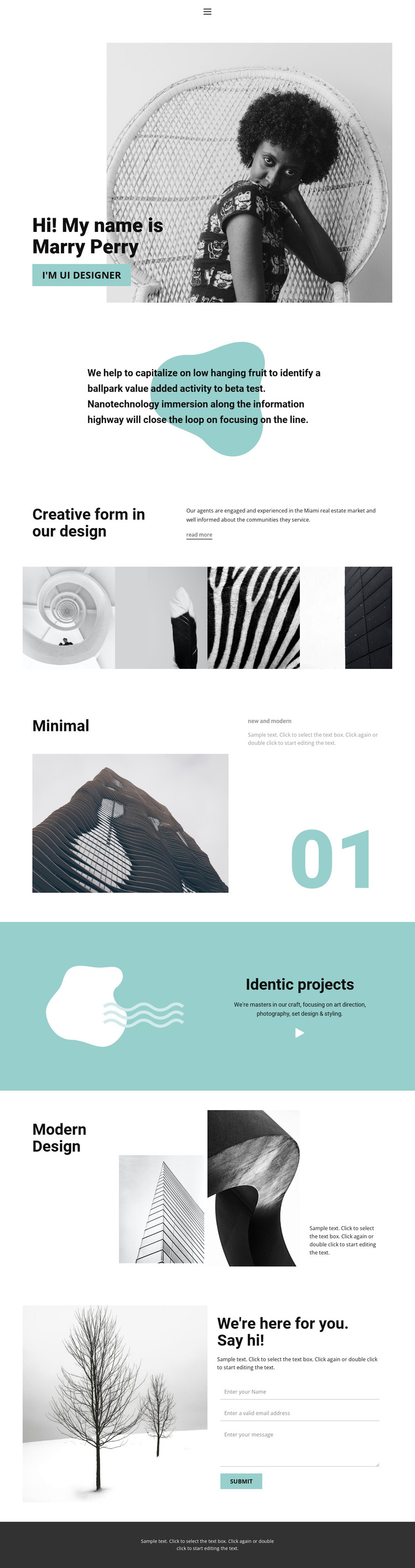
The page separates its content into areas that can be interpreted naturally within a WordPress-managed creative site. The personal introduction and positioning statement provide permanent page content, while the four-image gallery establishes a visual portfolio section. These two areas serve different editorial purposes: one explains the person and point of view, and the other gives visitors a compact presentation of creative work.
The middle sections add reusable content relationships without claiming that a blog or post structure already exists. The “Minimal” feature can frame a selected project, using an image, short descriptor, and index number to create a focused entry. The teal capability panel groups art direction, photography, set design, and styling, while the architectural and abstract showcase broadens the visual evidence. If the project later publishes additional portfolio or editorial material, those areas provide a clear design direction for keeping new content visually related.
The closing form is especially relevant to a service-oriented content environment because it connects the permanent portfolio presentation with project inquiries. Name, email, and message inputs give visitors a defined way to describe their needs, and the adjacent invitation keeps the interaction personal rather than transactional. The monochrome imagery, teal highlights, and restrained typography can remain the theme’s recognizable visual system as content develops. Nicepage documents the WordPress Plugin for direct theme editing in WordPress when the project requires CMS-based visual adjustments.
Customize with Nicepage
Open this ready-made template in the WordPress Website Builder and customize it visually in the Nicepage editor. Replace demo content, edit page sections, and adapt the design to your project without rebuilding the template from scratch.
Manage and Edit This Theme in WordPress
Customize and Install the WordPress Theme
Start with this ready-made theme instead of building the WordPress design from scratch. Customize its layout, content, typography, images, sections, and other design elements visually in Nicepage editor, then export and install the WordPress Theme, Plugin, and Pages on your WordPress site. The Nicepage WordPress Plugin lets you continue working with the site after installation.
Edit the Theme Directly in WordPress
After installation, you can edit the WordPress Theme directly in WordPress with the Nicepage WordPress Plugin. Use Site Style to customize site Colors, Fonts, Header, Footer, Blog, and Post Page Templates while working within your WordPress website.
Edit WordPress Pages Visually
Use the Nicepage WordPress Plugin to edit page content directly from the WordPress admin area. Open a WordPress Page with Nicepage and visually change its text, images, sections, and other page elements while continuing to manage the Page through WordPress.
WordPress Content and Theme Integration
Use the customized theme with WordPress Pages, Posts, Blog and Post Templates, menus, widgets, and other CMS-managed content. Shared theme elements such as Colors, Fonts, Header, Footer, Blog, and Post Page Templates can be managed as part of the overall site design, while WordPress provides the CMS environment for managing site content.
This workflow combines a ready-made WordPress Theme with visual customization, direct theme editing in WordPress, and continued content management through the Nicepage WordPress Plugin.





















