Luxury Apartments Template


Edit Template Offline
2. Create new page and search for id 24215
Edit Template Online
Create Awesome Websites


Free Nicepage Builder
Keywords
A Delft stay is presented through interiors, amenities, and local discovery
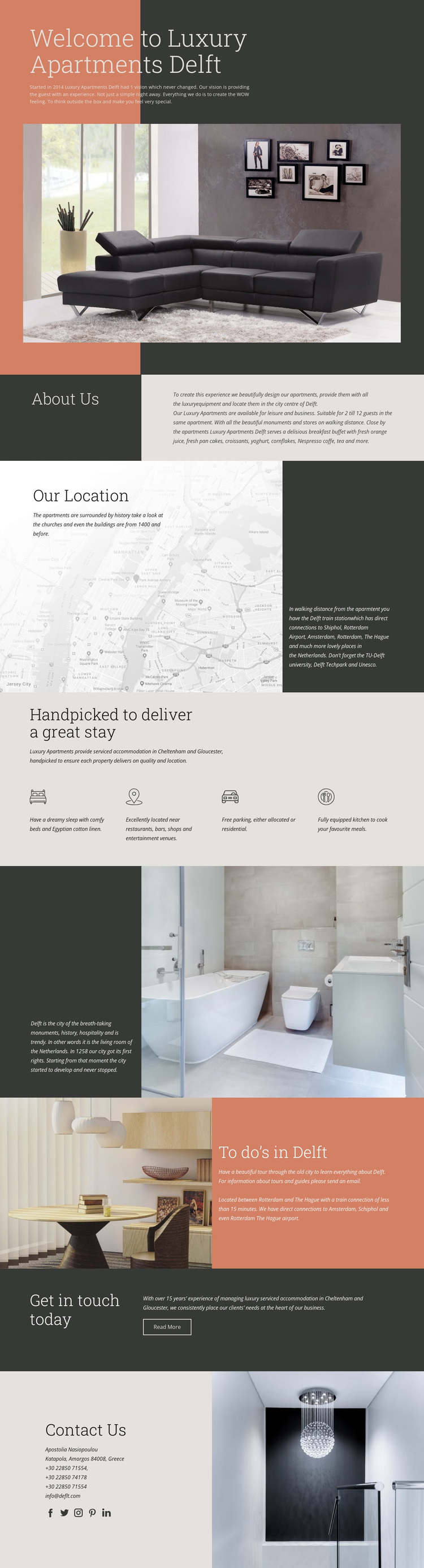
The design is a useful choice when accommodation needs to be explained through both the property and its destination. A large living-room image leads the introduction, making the apartment experience visible before the page moves into written detail. About Us then provides the accommodation context, while Our Location connects the stay with historic surroundings and transport information rather than treating the property as an isolated interior.
Its four-item amenity grid gives the page a practical center of gravity. Comfortable beds and linen, a central location, free parking, and an equipped kitchen are presented as equally important parts of the stay. That balance helps the design serve visitors who want an atmospheric impression as well as concrete information for planning a leisure or business visit. The later Delft history and “To do’s in Delft” sections add another layer by showing what surrounds the accommodation.
The template also covers the final communication stage without relying on a large sales-heavy structure. Get in touch today introduces a simple next step, and Contact Us follows with direct details and social links. This combination makes the design especially suitable for a hospitality project that needs a calm editorial tone, strong interior imagery, practical amenities, destination guidance, and a visible route toward contact. Its distinction comes from the relationship between apartment storytelling and local travel information, not from a generic accommodation claim alone.
Customize with Nicepage
Open this ready-made template in the Template Builder and customize it visually in the Nicepage editor. Replace demo content, edit page sections, and adapt the design to your project without rebuilding the template from scratch.
Start With a Ready-Made Template
Choose a Design for a New Page
Use a ready-made template as a starting point instead of creating every page from a blank canvas. When adding a new page in Nicepage, browse available designs, compare different layouts, and choose an option that already fits the general purpose and visual direction of your project.
Browse Different Page Designs
Explore Page Designs using search, thematic categories, Design Sets, and full-page previews. The collection includes layouts for different subjects and page purposes, making it easier to compare alternatives before selecting a design to customize.
Customize the Selected Template
After choosing a design, create the page and continue editing it visually in Nicepage. Replace the demo content, adjust images, typography, colors, sections, and other elements, and adapt the ready-made layout to your own content instead of rebuilding the design from the beginning.
Explore More Design Directions
If the first option does not match your project closely enough, return to the design collection and compare other templates before committing to a layout. This makes the template library useful not only for faster page creation, but also for exploring different visual approaches and finding a suitable starting point for a new project.
This workflow gives you access to a broad collection of ready-made designs that can be selected, compared, and customized according to the needs of each new page or project.