Progress in robot technology Template


Edit Template Offline
2. Create new page and search for id 23330
Edit Template Online
Create Awesome Websites


Free Nicepage Builder
Keywords
Robot Imagery and Emerging-Technology Categories Give the Design Its Direction
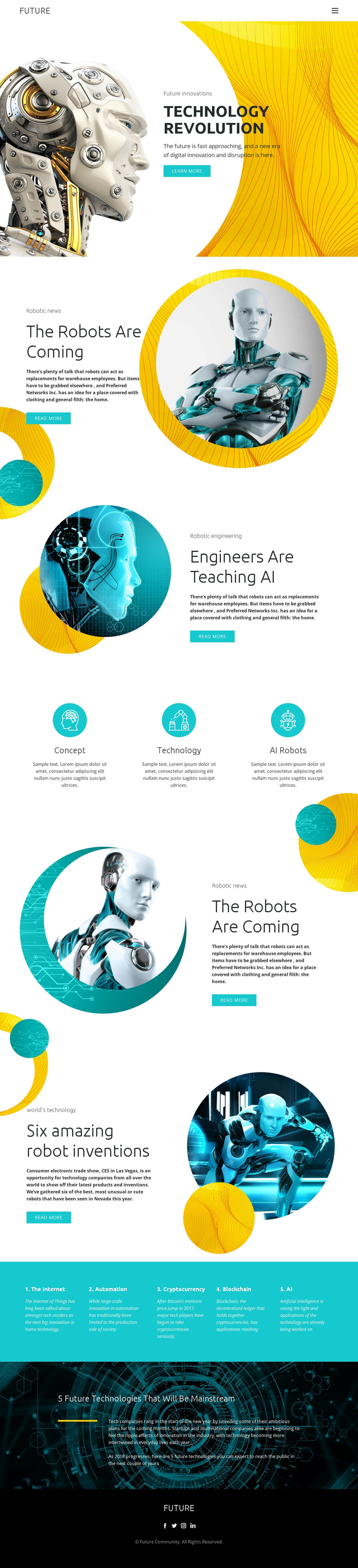
Large robot imagery carries much of the page’s identity. The opening hero establishes a technology-revolution theme, while circular robot portraits reappear beside sections about robotics, AI engineering, and inventions. This repeated treatment makes the design feel focused on visual explanation rather than on a generic business layout. The Learn more and Read more actions reinforce that editorial approach by inviting exploration of the subjects introduced in each block.
The design also covers a notably broad but related set of categories. Three icon-led items summarize technology concepts, and the turquoise band expands the scope to the Internet, Automation, Cryptocurrency, Blockchain, and AI. That combination gives a project room to present both a central robotics subject and the surrounding technologies that influence it. The dark closing statement about future technologies adds a forward-looking conclusion without changing the page’s main theme.
This is a useful choice when the design needs to make emerging technology understandable through image-led sections, short topic groupings, and visible progression. Its strongest distinction is the relationship between futuristic robot imagery and a categorized technology vocabulary. The circular crops, yellow and turquoise accents, technical line patterns, and spacious typography support that message while leaving the exact project text open for replacement. The result is a ready-made direction for a robotics or AI showcase, not merely a collection of unrelated visual effects.
Customize with Nicepage
Open this ready-made template in the Template Builder and customize it visually in the Nicepage editor. Replace demo content, edit page sections, and adapt the design to your project without rebuilding the template from scratch.
Start With a Ready-Made Template
Choose a Design for a New Page
Use a ready-made template as a starting point instead of creating every page from a blank canvas. When adding a new page in Nicepage, browse available designs, compare different layouts, and choose an option that already fits the general purpose and visual direction of your project.
Browse Different Page Designs
Explore Page Designs using search, thematic categories, Design Sets, and full-page previews. The collection includes layouts for different subjects and page purposes, making it easier to compare alternatives before selecting a design to customize.
Customize the Selected Template
After choosing a design, create the page and continue editing it visually in Nicepage. Replace the demo content, adjust images, typography, colors, sections, and other elements, and adapt the ready-made layout to your own content instead of rebuilding the design from the beginning.
Explore More Design Directions
If the first option does not match your project closely enough, return to the design collection and compare other templates before committing to a layout. This makes the template library useful not only for faster page creation, but also for exploring different visual approaches and finding a suitable starting point for a new project.
This workflow gives you access to a broad collection of ready-made designs that can be selected, compared, and customized according to the needs of each new page or project.