About virtual reality Template


Edit Template Offline
2. Create new page and search for id 685660
Edit Template Online
Create Awesome Websites


Free Nicepage Builder
Keywords
Headset Photography Meets Education, Safety, and VR Gaming Content
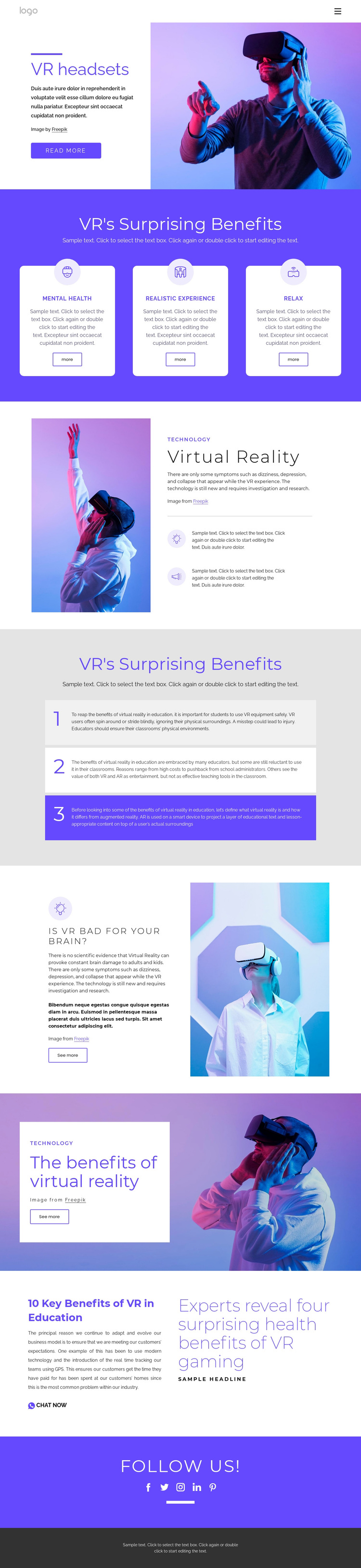
Large photographs of people using VR headsets carry much of the design’s initial impact, beginning with the split “VR headsets” introduction and continuing through image-led benefits and safety content. That emphasis makes the page a useful choice for projects that need virtual reality to be understood visually as well as through explanatory copy. The photography is supported by three rounded cards covering Mental Health, Realistic Experience, and Relax, so the design can present several benefit themes without becoming a plain text article.
Its content coverage is another distinguishing factor. The page does not stop at general technology information: it includes two supporting points, three numbered panels about VR in education, a question about whether VR is bad for the brain, and an editorial headline about health benefits of VR gaming. These sections create a broader educational and informational range than a layout focused only on products or entertainment. Purple backgrounds and alternating light panels help separate those subjects while preserving a coherent visual direction.
The design also includes practical engagement cues: Read more, More, See more, and Chat Now appear at different points, followed by five social network links. That combination suits an informational project that wants to encourage continued reading or conversation. As a template choice, its main value is the relationship between strong imagery, benefit-led cards, educational structure, and safety-aware content.
Customize with Nicepage
Open this ready-made template in the Template Builder and customize it visually in the Nicepage editor. Replace demo content, edit page sections, and adapt the design to your project without rebuilding the template from scratch.
Start With a Ready-Made Template
Choose a Design for a New Page
Use a ready-made template as a starting point instead of creating every page from a blank canvas. When adding a new page in Nicepage, browse available designs, compare different layouts, and choose an option that already fits the general purpose and visual direction of your project.
Browse Different Page Designs
Explore Page Designs using search, thematic categories, Design Sets, and full-page previews. The collection includes layouts for different subjects and page purposes, making it easier to compare alternatives before selecting a design to customize.
Customize the Selected Template
After choosing a design, create the page and continue editing it visually in Nicepage. Replace the demo content, adjust images, typography, colors, sections, and other elements, and adapt the ready-made layout to your own content instead of rebuilding the design from the beginning.
Explore More Design Directions
If the first option does not match your project closely enough, return to the design collection and compare other templates before committing to a layout. This makes the template library useful not only for faster page creation, but also for exploring different visual approaches and finding a suitable starting point for a new project.
This workflow gives you access to a broad collection of ready-made designs that can be selected, compared, and customized according to the needs of each new page or project.