Strategic consultancy Template



Edit Template Offline
2. Create new page and search for id 1130682
Edit Template Online
Create Awesome Websites


Free Nicepage Builder
Keywords
Consulting breadth is balanced with clear visual content groups
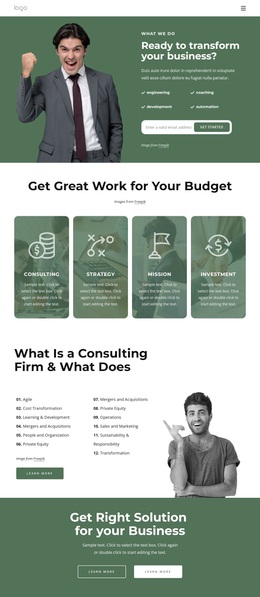
The strongest reason to choose this design is the way it covers several consulting questions without presenting one uninterrupted block of text. The opening strategy section pairs a large photograph with a text panel and four concise capability cards, allowing the page to introduce both the subject and its working qualities. A separate coaching-benefits section then makes room for individual support, while the budget cards organize another set of choices around Consulting, Strategy, Mission, and Investment.
The six numbered service cards make the design especially suitable when a consultancy needs to show breadth. Marketing, Operations, Strategy, Procurement, Sustainability, and Private Equity are distinct enough to scan quickly but belong to the same overall service story. The expandable FAQ adds a practical information layer, and the four team profiles shift the page from abstract capabilities toward the people associated with the work. These relationships give the layout more substance than a simple hero-and-contact pattern.
The page also includes five partner logos and a wide success section with four metric labels: Projects, Clients, Our Team, and Awards. Those sample values should be replaced rather than treated as verified achievements, but the sections show where supporting evidence can sit. The closing contact area combines a dark form panel with contact details, so the design finishes with a direct way to continue the conversation after visitors have reviewed the offer.
Customize with Nicepage
Open this ready-made template in the Template Builder and customize it visually in the Nicepage editor. Replace demo content, edit page sections, and adapt the design to your project without rebuilding the template from scratch.
Start With a Ready-Made Template
Choose a Design for a New Page
Use a ready-made template as a starting point instead of creating every page from a blank canvas. When adding a new page in Nicepage, browse available designs, compare different layouts, and choose an option that already fits the general purpose and visual direction of your project.
Browse Different Page Designs
Explore Page Designs using search, thematic categories, Design Sets, and full-page previews. The collection includes layouts for different subjects and page purposes, making it easier to compare alternatives before selecting a design to customize.
Customize the Selected Template
After choosing a design, create the page and continue editing it visually in Nicepage. Replace the demo content, adjust images, typography, colors, sections, and other elements, and adapt the ready-made layout to your own content instead of rebuilding the design from the beginning.
Explore More Design Directions
If the first option does not match your project closely enough, return to the design collection and compare other templates before committing to a layout. This makes the template library useful not only for faster page creation, but also for exploring different visual approaches and finding a suitable starting point for a new project.
This workflow gives you access to a broad collection of ready-made designs that can be selected, compared, and customized according to the needs of each new page or project.