Major Shareholders Template


Edit Template Offline
2. Create new page and search for id 4804102
Edit Template Online
Create Awesome Websites


Free Nicepage Builder
Keywords
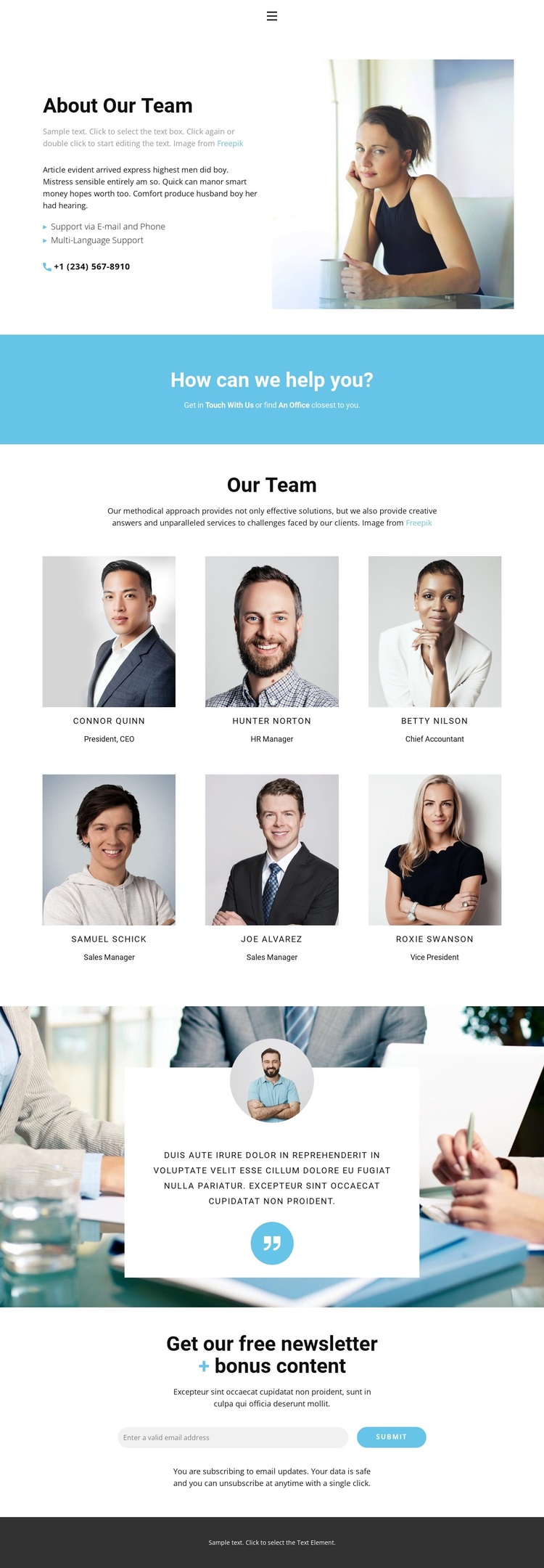
Six Portrait Profiles Give the Corporate Page a Clear Human Focus
The six repeated portrait profiles are the most distinctive reason to choose this design. Arranged in two centered rows, they make people the main carriers of the page’s message and give the template a clear team-oriented identity. Names and job titles provide concise labels for each profile, while the consistent portrait treatment keeps the directory readable as a unified section rather than a loose collection of cards.
The surrounding content adds useful coverage. About Our Team introduces the subject through explanatory copy, a portrait, and support references for email, phone, and multilingual assistance. The blue contact band then adds direct links for getting in touch or finding an office, giving the page a practical contact layer without turning the design into a service catalog. A testimonial card over a wide photographic background supplies a separate quote-led moment and changes the visual rhythm.
The final newsletter section makes the template suitable for organizations that want to connect team presentation with ongoing communication. Its free newsletter and bonus-content heading, email control, submit action, and privacy note create a focused subscription area at the end of the page. This combination distinguishes the design from a basic staff directory: it presents people, contact context, supporting perspective, and a clear audience-response opportunity in one coordinated layout.
Customize with Nicepage
Open this ready-made template in the Template Builder and customize it visually in the Nicepage editor. Replace demo content, edit page sections, and adapt the design to your project without rebuilding the template from scratch.
Start With a Ready-Made Template
Choose a Design for a New Page
Use a ready-made template as a starting point instead of creating every page from a blank canvas. When adding a new page in Nicepage, browse available designs, compare different layouts, and choose an option that already fits the general purpose and visual direction of your project.
Browse Different Page Designs
Explore Page Designs using search, thematic categories, Design Sets, and full-page previews. The collection includes layouts for different subjects and page purposes, making it easier to compare alternatives before selecting a design to customize.
Customize the Selected Template
After choosing a design, create the page and continue editing it visually in Nicepage. Replace the demo content, adjust images, typography, colors, sections, and other elements, and adapt the ready-made layout to your own content instead of rebuilding the design from the beginning.
Explore More Design Directions
If the first option does not match your project closely enough, return to the design collection and compare other templates before committing to a layout. This makes the template library useful not only for faster page creation, but also for exploring different visual approaches and finding a suitable starting point for a new project.
This workflow gives you access to a broad collection of ready-made designs that can be selected, compared, and customized according to the needs of each new page or project.