Challenge your scientific knowledge Joomla Template


Edit Template Offline
2. Create new page and search for id 6533203
Edit Template Online
Create Awesome Websites


Free Nicepage Builder
Keywords
Quiz Categories and Collections Create Structured Joomla Content Areas
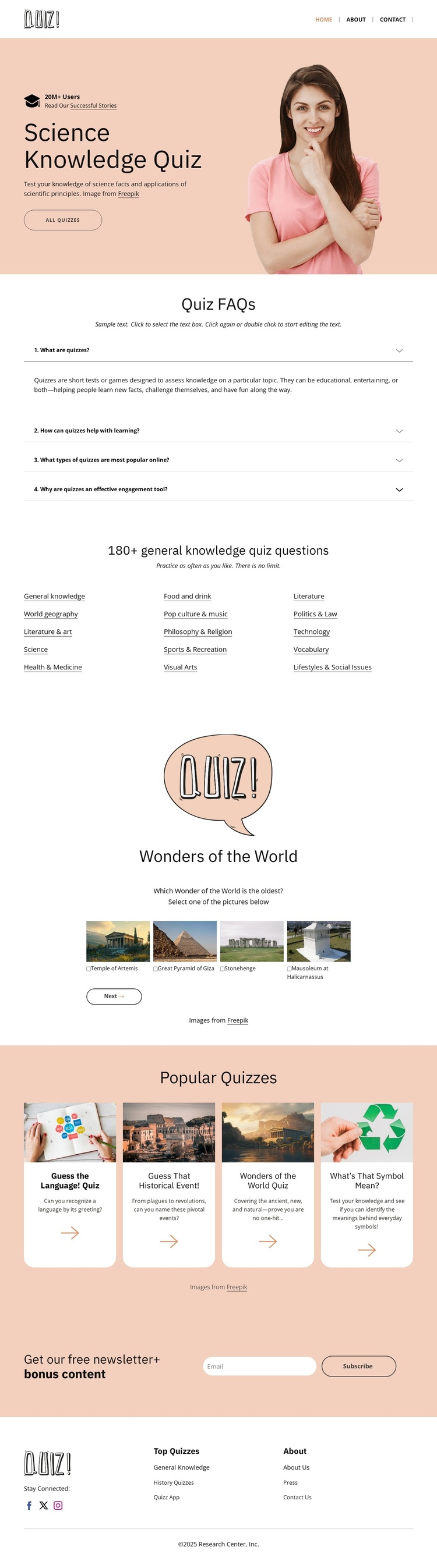
The category directory is the strongest organizing feature for a CMS-managed quiz site. It separates broad subjects such as General Knowledge, Science, History, Technology, World Geography, and Literature into visible groups, giving recurring informational content a clear place within the page. The Quiz FAQs add another structured layer: four question-and-answer rows can explain how the quizzes work without competing with the main browsing areas. Together, these sections create more than a single promotional message; they divide the design into understandable content regions.
The Wonders of the World collection and Popular Quizzes collection support a second kind of organization. The first uses image-led cards to frame a themed group, while the second repeats rounded cards with thumbnails, descriptions, and arrow actions for a broader selection. In a Joomla project, those distinctions can help separate themed quiz material from general quiz listings while keeping the same visual direction across the page. The header and footer reinforce shared navigation through topic links, About links, social icons, and brand information. The newsletter area provides a separate contact and subscription region at the end of the content journey. This combination suits a structured educational publishing layout in which categories, collections, questions, and subscription content need clearly recognizable places.
Customize with Nicepage
Open this ready-made template in the Joomla Page Builder and customize it visually in the Nicepage editor. Replace demo content, edit page sections, and adapt the design to your project without rebuilding the template from scratch.
Work With This Template in Joomla
Customize and Install the Joomla Template
Start with this ready-made template instead of building the Joomla design from scratch. Customize its layout, content, typography, images, sections, and other design elements visually in the Nicepage application, then export and install the Joomla Template, Nicepage Extension, and supported content on your Joomla website.
Edit the Template Directly in Joomla
After installation, you can edit the Joomla Template directly in Joomla with the Nicepage Joomla Extension. Customize the Header, Footer, Colors, Fonts, typography, and Page Templates from the Joomla workflow while keeping the site design connected with your CMS content.
Edit Joomla Articles Visually
Use the Nicepage Joomla Extension to open and edit Joomla Articles visually from the Joomla Administrator. Change text, images, sections, layouts, and other page content in the Nicepage editor while continuing to manage the Articles through Joomla.
Joomla Content and Template Integration
Use the customized template together with Joomla Articles, module Positions, menus, forms, Blog Pages, and other supported CMS elements. With the Nicepage Extension used as the Site Style Source, shared design settings can be applied across Joomla Articles while Joomla continues to provide the CMS environment for managing site content.
This workflow combines a ready-made Joomla Template with visual customization, direct template editing in Joomla, and continued content management through the Nicepage Joomla Extension.