Holly Meyer Joomla Template


Edit Template Offline
2. Create new page and search for id 22404
Edit Template Online
Create Awesome Websites


Free Nicepage Builder
Keywords
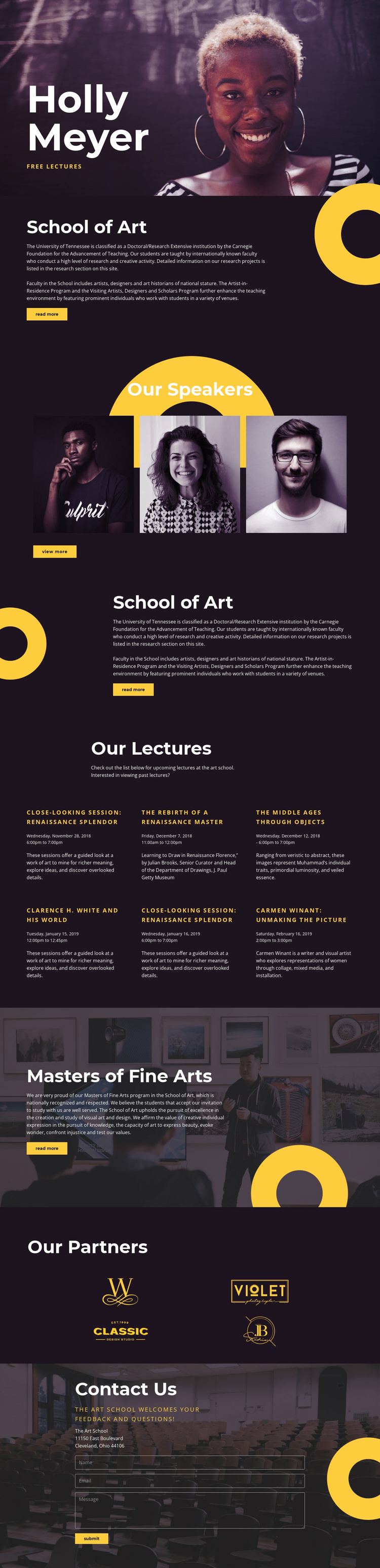
Lecture Entries and Partner Marks Divide the School Content into Managed Regions
The page separates several kinds of institutional information into recognizable regions. The Holly Meyer hero introduces the free lecture, the School of Art sections provide explanatory material, and the three speaker portraits give the program a people-focused area. Six lecture entries then form a repeated content group with room for dates and descriptions. This distinction is useful for a CMS-managed art-school site because recurring informational content does not need to be presented as one uninterrupted text block.
The Masters of Fine Arts section adds a second educational emphasis, while the four partner marks create a compact area for associated organizations. Near the bottom, the Contact Us block combines location information in Cleveland, Ohio with a message form requesting a name, email address, and message. Shared navigation and repeated section treatments can keep these regions connected while the underlying institutional content is maintained separately.
For Joomla, the design therefore offers a clear relationship between menu-led areas, structured educational information, event-like lecture content, and contact communication. The page does not require the CMS interpretation to invent articles or categories; its verified sections already show where recurring lecture descriptions, program information, speaker content, partner references, and contact material can belong. The result is a coherent Joomla-oriented content structure grounded in the actual page.
Customize with Nicepage
Open this ready-made template in the Joomla Page Builder and customize it visually in the Nicepage editor. Replace demo content, edit page sections, and adapt the design to your project without rebuilding the template from scratch.
Work With This Template in Joomla
Customize and Install the Joomla Template
Start with this ready-made template instead of building the Joomla design from scratch. Customize its layout, content, typography, images, sections, and other design elements visually in the Nicepage application, then export and install the Joomla Template, Nicepage Extension, and supported content on your Joomla website.
Edit the Template Directly in Joomla
After installation, you can edit the Joomla Template directly in Joomla with the Nicepage Joomla Extension. Customize the Header, Footer, Colors, Fonts, typography, and Page Templates from the Joomla workflow while keeping the site design connected with your CMS content.
Edit Joomla Articles Visually
Use the Nicepage Joomla Extension to open and edit Joomla Articles visually from the Joomla Administrator. Change text, images, sections, layouts, and other page content in the Nicepage editor while continuing to manage the Articles through Joomla.
Joomla Content and Template Integration
Use the customized template together with Joomla Articles, module Positions, menus, forms, Blog Pages, and other supported CMS elements. With the Nicepage Extension used as the Site Style Source, shared design settings can be applied across Joomla Articles while Joomla continues to provide the CMS environment for managing site content.
This workflow combines a ready-made Joomla Template with visual customization, direct template editing in Joomla, and continued content management through the Nicepage Joomla Extension.