Investment and pricing Joomla Template



Structured Package Information Fits a Managed Content Region
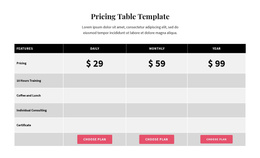
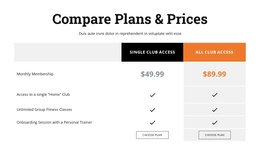
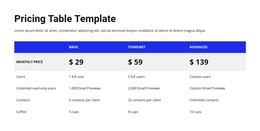
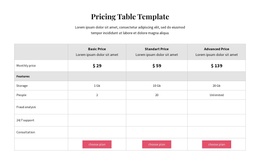
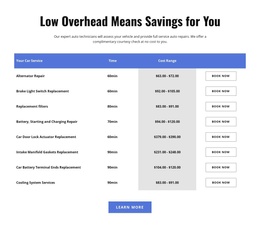
The table separates the pricing information into stable content units that can remain recognizable inside a Joomla-managed page. A row-label column gives the comparison its reference structure, while the Basic, Growth, and Premium columns hold their own package names, monthly prices, descriptions, and included support. The displayed prices—$2,500, $5,000, and $10,000—are tied to those named columns rather than presented as a loose list. Four feature rows then make the differences easier to review across the same vertical positions.
The content also has a useful progression. The centered “Investment & Pricing” heading and introduction explain the section before the reader reaches the detailed service comparison. Within the table, Basic includes a monthly strategy call and initial business audit, Growth includes market research and competitive analysis, and Premium includes weekly one-to-one coaching and custom strategy development. These relationships give the section a defined informational role without requiring it to represent an entire site or CMS template.
For Joomla-oriented use, the block can function as a reusable pricing area within a broader page whose surrounding content is managed separately. Its visual structure remains intact while related editorial or service information can be maintained elsewhere in the project. The blue header row, gray price band, and white feature area also help preserve the distinction between package identity, cost, and included support when the section is placed among other managed content regions.
Customize with Nicepage
Open this ready-made template in the Joomla Page Builder and customize it visually in the Nicepage editor. Replace demo content, edit page sections, and adapt the design to your project without rebuilding the template from scratch.
Edit Template Offline
2. Create a new page or select existing
3. Click Add new block, search for id 6499048 and click enter
Edit Template Online
Create Awesome Websites


Free Nicepage Builder
Keywords
Work With This Template in Joomla
Customize and Install the Joomla Template
Start with this ready-made template instead of building the Joomla design from scratch. Customize its layout, content, typography, images, sections, and other design elements visually in the Nicepage application, then export and install the Joomla Template, Nicepage Extension, and supported content on your Joomla website.
Edit the Template Directly in Joomla
After installation, you can edit the Joomla Template directly in Joomla with the Nicepage Joomla Extension. Customize the Header, Footer, Colors, Fonts, typography, and Page Templates from the Joomla workflow while keeping the site design connected with your CMS content.
Edit Joomla Articles Visually
Use the Nicepage Joomla Extension to open and edit Joomla Articles visually from the Joomla Administrator. Change text, images, sections, layouts, and other page content in the Nicepage editor while continuing to manage the Articles through Joomla.
Joomla Content and Template Integration
Use the customized template together with Joomla Articles, module Positions, menus, forms, Blog Pages, and other supported CMS elements. With the Nicepage Extension used as the Site Style Source, shared design settings can be applied across Joomla Articles while Joomla continues to provide the CMS environment for managing site content.
This workflow combines a ready-made Joomla Template with visual customization, direct template editing in Joomla, and continued content management through the Nicepage Joomla Extension.