
Recruiting agency with good experience Joomla Template


Edit Template Offline
2. Create new page and search for id 325936
Edit Template Online
Create Awesome Websites


Free Nicepage Builder
Keywords
Service, Location, and Inquiry Regions Suit Structured CMS Content
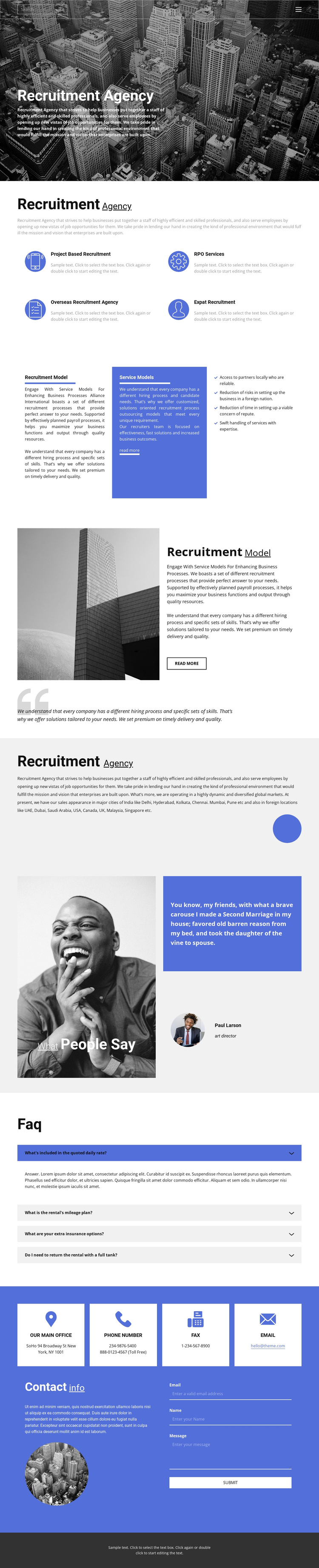
The four service items give the design a natural set of structured information areas: project-based recruitment, RPO services, overseas recruitment, and expat recruitment. They sit below the agency introduction and can be treated as recurring service content rather than isolated decorative labels. The recruitment-model sections provide another level of organization, combining explanatory text, a highlighted blue panel, a four-item benefits list, and a separate process explanation beside an architectural image. This division makes the page suitable for a recruitment site whose information is grouped into recognizable subject areas.
The geographic overview adds a separate regional content role by mentioning locations in India and several international markets. A testimonial and FAQ accordion then support the main service information with customer-oriented and question-based content, while the contact area brings together four contact cards and an inquiry form with email, name, and message fields. Shared navigation, mobile navigation, and the footer provide reusable site regions around these content groups. In a Joomla project, this arrangement can support CMS-managed agency information without treating the demo names, addresses, phone numbers, or rental-themed FAQ wording as verified business facts. The design’s value lies in its division into services, models, locations, supporting questions, and contact content, which can be replaced with accurate editorial material while retaining the visual organization.
Customize with Nicepage
Open this ready-made template in the Joomla Page Builder and customize it visually in the Nicepage editor. Replace demo content, edit page sections, and adapt the design to your project without rebuilding the template from scratch.
Work With This Template in Joomla
Customize and Install the Joomla Template
Start with this ready-made template instead of building the Joomla design from scratch. Customize its layout, content, typography, images, sections, and other design elements visually in the Nicepage application, then export and install the Joomla Template, Nicepage Extension, and supported content on your Joomla website.
Edit the Template Directly in Joomla
After installation, you can edit the Joomla Template directly in Joomla with the Nicepage Joomla Extension. Customize the Header, Footer, Colors, Fonts, typography, and Page Templates from the Joomla workflow while keeping the site design connected with your CMS content.
Edit Joomla Articles Visually
Use the Nicepage Joomla Extension to open and edit Joomla Articles visually from the Joomla Administrator. Change text, images, sections, layouts, and other page content in the Nicepage editor while continuing to manage the Articles through Joomla.
Joomla Content and Template Integration
Use the customized template together with Joomla Articles, module Positions, menus, forms, Blog Pages, and other supported CMS elements. With the Nicepage Extension used as the Site Style Source, shared design settings can be applied across Joomla Articles while Joomla continues to provide the CMS environment for managing site content.
This workflow combines a ready-made Joomla Template with visual customization, direct template editing in Joomla, and continued content management through the Nicepage Joomla Extension.





















