Simple pricing table design Joomla Template


Structured Hardware Rows Form a Joomla Content Region
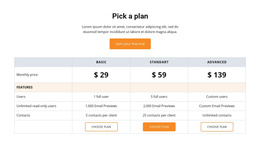
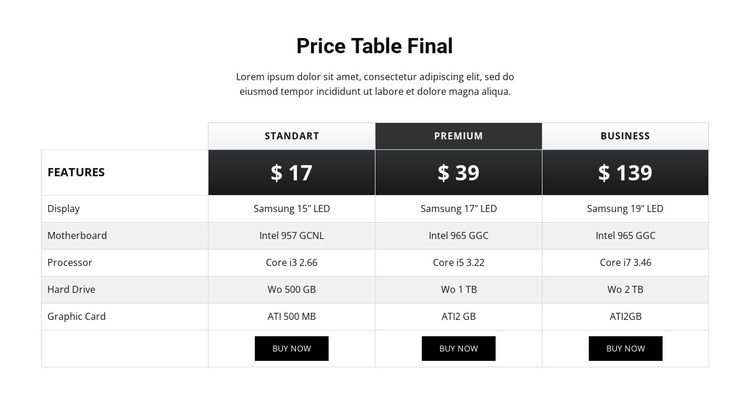
The heading and supporting paragraph define a compact information area before the table presents the comparison itself. Its content is organized around five named hardware criteria—Display, Motherboard, Processor, Hard Drive, and Graphic Card—repeated across three plan columns. Standart, Premium, and Business therefore read as structured configuration choices rather than unrelated text panels. The left-side feature column preserves the meaning of every value as the reader moves across the table.
In a Joomla-managed page, this block can serve as a stable pricing and product-information region while the wider site handles other editorial or navigational content. The repeated buy-now actions give each plan a consistent response point, but the section still centers on comparing specifications. The dark Premium header and price cell provide a visual cue for one plan, while the light borders and alternating rows keep the technical information grouped and readable.
The CMS-oriented interpretation comes from the block’s structured information model: one heading group, one comparison table, three plan records, and five shared attribute rows. That makes the section suitable for a Joomla content area where the surrounding project may manage related descriptions or pages separately. The block retains its own static comparison logic and does not need to become a complete Joomla site or template to contribute useful pricing content.
Customize with Nicepage
Open this ready-made template in the Joomla Page Builder and customize it visually in the Nicepage editor. Replace demo content, edit page sections, and adapt the design to your project without rebuilding the template from scratch.
Edit Template Offline
2. Create a new page or select existing
3. Click Add new block, search for id 86065 and click enter
Edit Template Online
Create Awesome Websites


Free Nicepage Builder
Keywords
Work With This Template in Joomla
Customize and Install the Joomla Template
Start with this ready-made template instead of building the Joomla design from scratch. Customize its layout, content, typography, images, sections, and other design elements visually in the Nicepage application, then export and install the Joomla Template, Nicepage Extension, and supported content on your Joomla website.
Edit the Template Directly in Joomla
After installation, you can edit the Joomla Template directly in Joomla with the Nicepage Joomla Extension. Customize the Header, Footer, Colors, Fonts, typography, and Page Templates from the Joomla workflow while keeping the site design connected with your CMS content.
Edit Joomla Articles Visually
Use the Nicepage Joomla Extension to open and edit Joomla Articles visually from the Joomla Administrator. Change text, images, sections, layouts, and other page content in the Nicepage editor while continuing to manage the Articles through Joomla.
Joomla Content and Template Integration
Use the customized template together with Joomla Articles, module Positions, menus, forms, Blog Pages, and other supported CMS elements. With the Nicepage Extension used as the Site Style Source, shared design settings can be applied across Joomla Articles while Joomla continues to provide the CMS environment for managing site content.
This workflow combines a ready-made Joomla Template with visual customization, direct template editing in Joomla, and continued content management through the Nicepage Joomla Extension.