Connect to nature WordPress Theme


Travel Page Content Framed by a Coastal Image
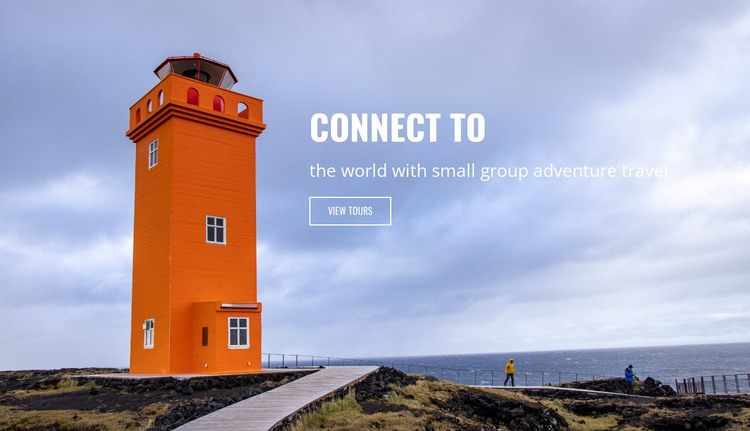
The heading “Connect to” works with the supporting line about small group adventure travel as stable introductory page content. Rather than separating the copy into a text panel, the section places it directly over a full-width coastal photograph. The lighthouse and walkway remain prominent on the left and lower portions of the image, while the right-side text area preserves a readable contrast against the blue sky. An outlined “View tours” button gives the message a practical next step.
For a WordPress-managed site, this block can fit naturally as a permanent hero section on a travel or tourism page. The headline and button can introduce the page’s subject, while the wider project manages related tour descriptions, destination content, images, or other publishable areas around it. The section’s content is specific enough to establish the travel theme, but bounded enough to coexist with other page content without carrying the responsibilities of a complete theme.
The arrangement also supports a clear distinction between editorial message and visual evidence. The words explain the small-group adventure focus; the coastal lighthouse scene establishes atmosphere and place without replacing the text. That balance makes the block useful when a WordPress page needs a strong opening region that directs visitors toward tours and leaves detailed content to neighboring sections.
Customize with Nicepage
Open this ready-made template in the WordPress Website Builder and customize it visually in the Nicepage editor. Replace demo content, edit page sections, and adapt the design to your project without rebuilding the template from scratch.
Edit Template Offline
2. Create a new page or select existing
3. Click Add new block, search for id 72283 and click enter
Edit Template Online
Create Awesome Websites


Free Nicepage Builder
Keywords
Manage and Edit This Theme in WordPress
Customize and Install the WordPress Theme
Start with this ready-made theme instead of building the WordPress design from scratch. Customize its layout, content, typography, images, sections, and other design elements visually in Nicepage editor, then export and install the WordPress Theme, Plugin, and Pages on your WordPress site. The Nicepage WordPress Plugin lets you continue working with the site after installation.
Edit the Theme Directly in WordPress
After installation, you can edit the WordPress Theme directly in WordPress with the Nicepage WordPress Plugin. Use Site Style to customize site Colors, Fonts, Header, Footer, Blog, and Post Page Templates while working within your WordPress website.
Edit WordPress Pages Visually
Use the Nicepage WordPress Plugin to edit page content directly from the WordPress admin area. Open a WordPress Page with Nicepage and visually change its text, images, sections, and other page elements while continuing to manage the Page through WordPress.
WordPress Content and Theme Integration
Use the customized theme with WordPress Pages, Posts, Blog and Post Templates, menus, widgets, and other CMS-managed content. Shared theme elements such as Colors, Fonts, Header, Footer, Blog, and Post Page Templates can be managed as part of the overall site design, while WordPress provides the CMS environment for managing site content.
This workflow combines a ready-made WordPress Theme with visual customization, direct theme editing in WordPress, and continued content management through the Nicepage WordPress Plugin.