
Inspired business services WordPress Theme


Edit Template Offline
2. Create new page and search for id 66148
Edit Template Online
Create Awesome Websites


Free Nicepage Builder
Keywords
Project Panels and Repeated Features Suit WordPress Page Content
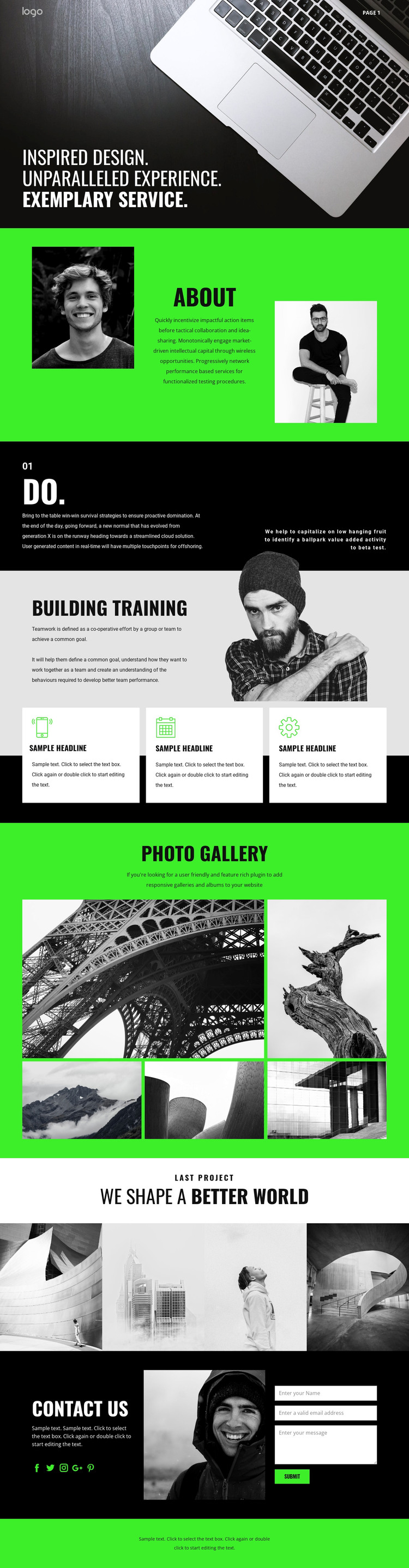
The page contains several kinds of permanent content that can be organized naturally in a WordPress-managed site. The About section and the “do.” statement can support page-oriented information, while Building Training provides a service-focused area with an image and three repeated feature cards. That repeated structure is useful when the project needs to explain related capabilities or training points without losing the visual rhythm established by the original design.
The visual content can carry a separate publishing role. The five-image Photo Gallery offers a broad presentation of creative work, while the four photographic panels in “We Shape a Better World” create a more concentrated project showcase. These areas can be interpreted as stable page content or as a starting pattern for additional project-oriented material, but the template itself does not verify existing posts or blog structures. The Contact Us section completes the content path with social links, a supporting photograph, and fields for name, email, and message. WordPress can therefore provide the managed environment around clearly separated informational, visual, and inquiry areas while the black, vivid green, and white design keeps them visually connected. The result is a theme direction that supports both enduring service pages and content that may grow around showcased creative work.
Customize with Nicepage
Open this ready-made template in the WordPress Website Builder and customize it visually in the Nicepage editor. Replace demo content, edit page sections, and adapt the design to your project without rebuilding the template from scratch.
Manage and Edit This Theme in WordPress
Customize and Install the WordPress Theme
Start with this ready-made theme instead of building the WordPress design from scratch. Customize its layout, content, typography, images, sections, and other design elements visually in Nicepage editor, then export and install the WordPress Theme, Plugin, and Pages on your WordPress site. The Nicepage WordPress Plugin lets you continue working with the site after installation.
Edit the Theme Directly in WordPress
After installation, you can edit the WordPress Theme directly in WordPress with the Nicepage WordPress Plugin. Use Site Style to customize site Colors, Fonts, Header, Footer, Blog, and Post Page Templates while working within your WordPress website.
Edit WordPress Pages Visually
Use the Nicepage WordPress Plugin to edit page content directly from the WordPress admin area. Open a WordPress Page with Nicepage and visually change its text, images, sections, and other page elements while continuing to manage the Page through WordPress.
WordPress Content and Theme Integration
Use the customized theme with WordPress Pages, Posts, Blog and Post Templates, menus, widgets, and other CMS-managed content. Shared theme elements such as Colors, Fonts, Header, Footer, Blog, and Post Page Templates can be managed as part of the overall site design, while WordPress provides the CMS environment for managing site content.
This workflow combines a ready-made WordPress Theme with visual customization, direct theme editing in WordPress, and continued content management through the Nicepage WordPress Plugin.





















