Aesthetic Architectural Excellence WordPress Theme


Edit Template Offline
2. Create new page and search for id 6488280
Edit Template Online
Create Awesome Websites


Free Nicepage Builder
Keywords
Contact Content and Repeated Office Information for WordPress
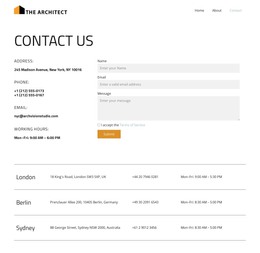
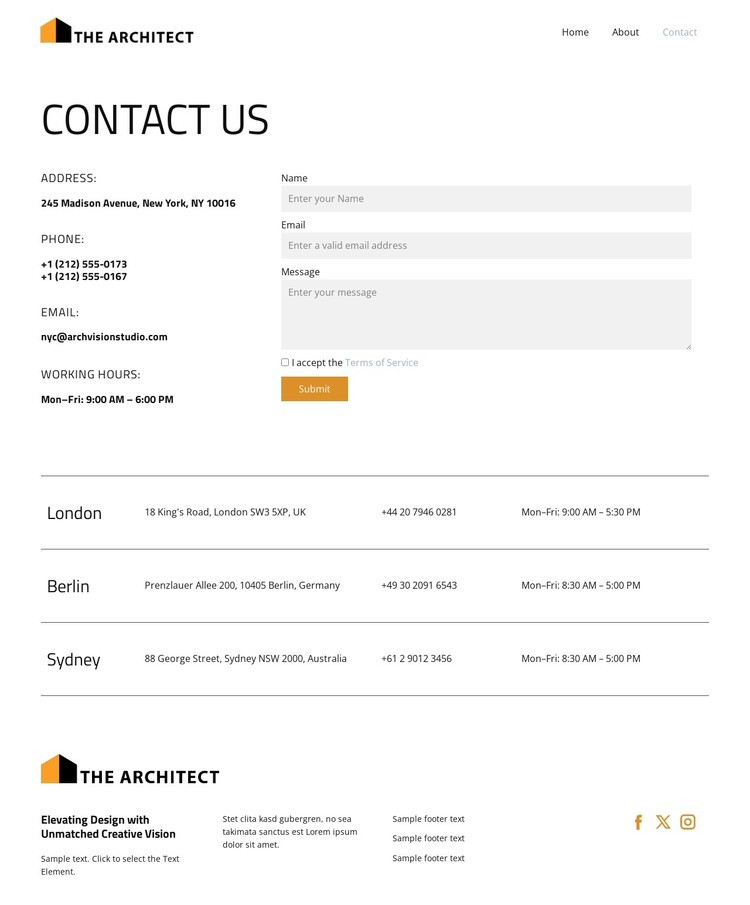
The form gives the page a clear permanent content role: visitors can read the contact information and submit a name, email address, and message without moving to a separate interaction area. The adjacent office details provide context for that request, while the Terms of Service option and Submit action mark the point where communication begins. This relationship suits a WordPress-managed page where the contact presentation remains part of the site’s main informational content.
The office directory introduces a second, repeatable content pattern. London, Berlin, and Sydney appear as three structured entries, each using the same kinds of location, address, phone, and working-hours information. That consistency is useful when a site needs to present several offices or contact destinations without giving one row a different visual treatment. The design does not require a blog or post structure to be useful; its strongest WordPress interpretation comes from the combination of page-oriented contact information and repeated content fields.
Home, About, and Contact navigation links place the page within a small site journey, while the footer adds a shared-looking brand area with text columns and three social links. The compact typography, white background, divider lines, and orange details keep those regions visually connected. As a WordPress theme direction, the design therefore supports a clear contact page, structured location content, and consistent shared site elements rather than only a standalone form.
Customize with Nicepage
Open this ready-made template in the WordPress Website Builder and customize it visually in the Nicepage editor. Replace demo content, edit page sections, and adapt the design to your project without rebuilding the template from scratch.
Manage and Edit This Theme in WordPress
Customize and Install the WordPress Theme
Start with this ready-made theme instead of building the WordPress design from scratch. Customize its layout, content, typography, images, sections, and other design elements visually in Nicepage editor, then export and install the WordPress Theme, Plugin, and Pages on your WordPress site. The Nicepage WordPress Plugin lets you continue working with the site after installation.
Edit the Theme Directly in WordPress
After installation, you can edit the WordPress Theme directly in WordPress with the Nicepage WordPress Plugin. Use Site Style to customize site Colors, Fonts, Header, Footer, Blog, and Post Page Templates while working within your WordPress website.
Edit WordPress Pages Visually
Use the Nicepage WordPress Plugin to edit page content directly from the WordPress admin area. Open a WordPress Page with Nicepage and visually change its text, images, sections, and other page elements while continuing to manage the Page through WordPress.
WordPress Content and Theme Integration
Use the customized theme with WordPress Pages, Posts, Blog and Post Templates, menus, widgets, and other CMS-managed content. Shared theme elements such as Colors, Fonts, Header, Footer, Blog, and Post Page Templates can be managed as part of the overall site design, while WordPress provides the CMS environment for managing site content.
This workflow combines a ready-made WordPress Theme with visual customization, direct theme editing in WordPress, and continued content management through the Nicepage WordPress Plugin.