Trusted by users WordPress Theme


Contact Information Organized as Stable WordPress Page Content
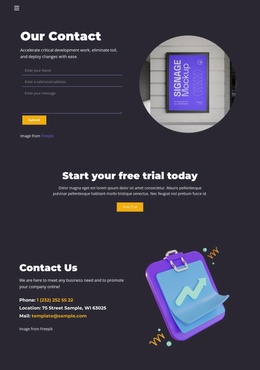
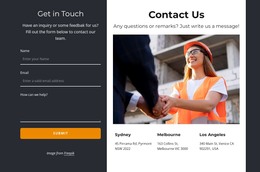
The heading, supporting sentence, and three-field form create a clearly bounded content area for a WordPress-managed page. “Our Contact” identifies the section, while the accompanying copy provides context before visitors enter a name, email address, and message. The Submit action completes that local exchange, making the block suitable for a permanent contact or inquiry area rather than a sequence of changing editorial items.
The form’s presentation is closely tied to the section’s visual organization. Thin underlined fields and generous spacing keep the input area open against the dark charcoal background, while bright white typography separates the bold heading from the smaller explanation. The yellow Submit button supplies a consistent action accent. On the right, the circular image adds supporting visual content and gives the section a recognizable shape that can sit alongside other WordPress-managed page sections.
In a broader WordPress site, this block can remain a stable page-content region while surrounding pages handle services, portfolio material, or other information. The visual arrangement keeps the contact purpose easy to identify, and the separation between the form column and image column makes the section straightforward to place within an existing page composition. Its value is the coordinated combination of explanation, data entry, response action, and visual balance.
Customize with Nicepage
Open this ready-made template in the WordPress Website Builder and customize it visually in the Nicepage editor. Replace demo content, edit page sections, and adapt the design to your project without rebuilding the template from scratch.
Edit Template Offline
2. Create a new page or select existing
3. Click Add new block, search for id 6200699 and click enter
Edit Template Online
Create Awesome Websites


Free Nicepage Builder
Keywords
Manage and Edit This Theme in WordPress
Customize and Install the WordPress Theme
Start with this ready-made theme instead of building the WordPress design from scratch. Customize its layout, content, typography, images, sections, and other design elements visually in Nicepage editor, then export and install the WordPress Theme, Plugin, and Pages on your WordPress site. The Nicepage WordPress Plugin lets you continue working with the site after installation.
Edit the Theme Directly in WordPress
After installation, you can edit the WordPress Theme directly in WordPress with the Nicepage WordPress Plugin. Use Site Style to customize site Colors, Fonts, Header, Footer, Blog, and Post Page Templates while working within your WordPress website.
Edit WordPress Pages Visually
Use the Nicepage WordPress Plugin to edit page content directly from the WordPress admin area. Open a WordPress Page with Nicepage and visually change its text, images, sections, and other page elements while continuing to manage the Page through WordPress.
WordPress Content and Theme Integration
Use the customized theme with WordPress Pages, Posts, Blog and Post Templates, menus, widgets, and other CMS-managed content. Shared theme elements such as Colors, Fonts, Header, Footer, Blog, and Post Page Templates can be managed as part of the overall site design, while WordPress provides the CMS environment for managing site content.
This workflow combines a ready-made WordPress Theme with visual customization, direct theme editing in WordPress, and continued content management through the Nicepage WordPress Plugin.