Modern music and technology WordPress Theme


Structured Product Information Fits a Stable WordPress Page Section
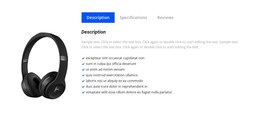
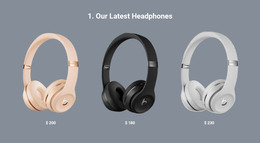
The “Tech Specs” heading and two labeled lists make this block suitable for stable product-information content within a WordPress-managed page. The left column keeps the headphone image visible as the visual subject. The center manufacturer-information list contains seven technical specifications, including the On Ear form factor, Bluetooth and Wireless connections, rechargeable lithium-ion battery, height, and weight. The right other-features list contains seven capability points, including noise isolation, a beam-forming microphone, an LED fuel gauge, and Micro-USB charging. These groups give the section a durable content role rather than the short-lived structure of a promotional announcement.
In a WordPress-oriented project, the section can remain part of a product page while the broader site manages other publishable content around it. Its value is the clear presentation of information that visitors may need to review repeatedly: physical details are separated from additional operating features, and the image keeps the product recognizable beside both lists. The white background and dark type can also align with other page sections without requiring this block to define a complete theme. A wider project may place purchase, related-product, support, or editorial content elsewhere, leaving this reusable section focused on the technical details it already presents.
Customize with Nicepage
Open this ready-made template in the WordPress Website Builder and customize it visually in the Nicepage editor. Replace demo content, edit page sections, and adapt the design to your project without rebuilding the template from scratch.
Edit Template Offline
2. Create a new page or select existing
3. Click Add new block, search for id 57191 and click enter
Edit Template Online
Create Awesome Websites


Free Nicepage Builder
Keywords
Manage and Edit This Theme in WordPress
Customize and Install the WordPress Theme
Start with this ready-made theme instead of building the WordPress design from scratch. Customize its layout, content, typography, images, sections, and other design elements visually in Nicepage editor, then export and install the WordPress Theme, Plugin, and Pages on your WordPress site. The Nicepage WordPress Plugin lets you continue working with the site after installation.
Edit the Theme Directly in WordPress
After installation, you can edit the WordPress Theme directly in WordPress with the Nicepage WordPress Plugin. Use Site Style to customize site Colors, Fonts, Header, Footer, Blog, and Post Page Templates while working within your WordPress website.
Edit WordPress Pages Visually
Use the Nicepage WordPress Plugin to edit page content directly from the WordPress admin area. Open a WordPress Page with Nicepage and visually change its text, images, sections, and other page elements while continuing to manage the Page through WordPress.
WordPress Content and Theme Integration
Use the customized theme with WordPress Pages, Posts, Blog and Post Templates, menus, widgets, and other CMS-managed content. Shared theme elements such as Colors, Fonts, Header, Footer, Blog, and Post Page Templates can be managed as part of the overall site design, while WordPress provides the CMS environment for managing site content.
This workflow combines a ready-made WordPress Theme with visual customization, direct theme editing in WordPress, and continued content management through the Nicepage WordPress Plugin.