
About collaborations WordPress Theme


Edit Template Offline
2. Create new page and search for id 514500
Edit Template Online
Create Awesome Websites


Free Nicepage Builder
Keywords
Service Content and Project Imagery Give WordPress Pages a Clear Editorial Shape
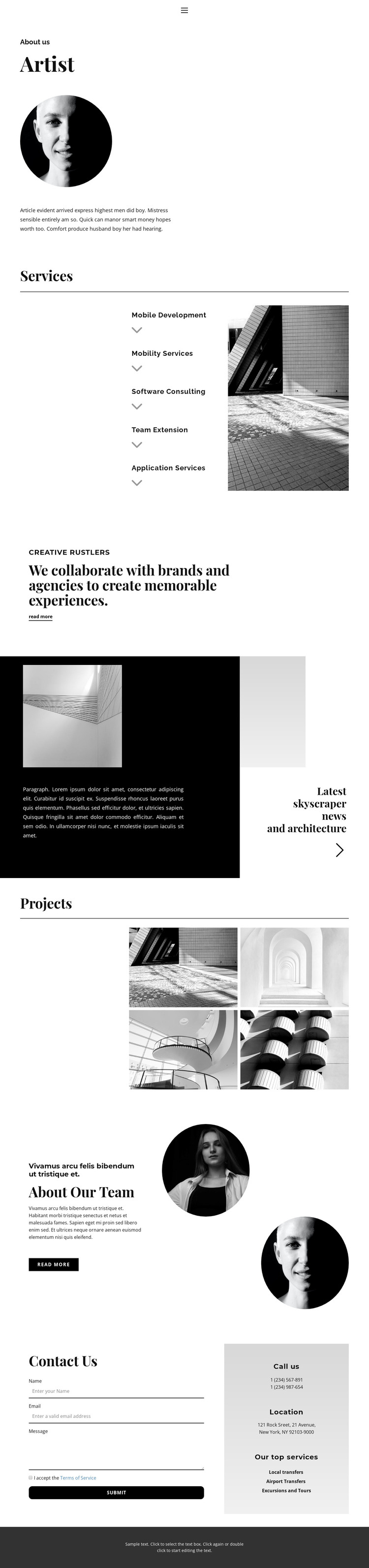
The Services section provides a natural page-oriented content core for a WordPress-managed presentation. Its five named offerings—Mobile Development, Mobility Services, Software Consulting, Team Extension, and Application Services—are grouped as a repeated list beside architectural imagery. That combination separates service information from visual context, making the design suitable for permanent company content while leaving room for fuller explanations or related project material elsewhere in the site.
The Projects gallery supports a different kind of content relationship. Four architectural images create a compact visual showcase, while the collaboration statement and its “Read more” action can lead visitors toward additional company or project information. The About Our Team section then shifts from work to people by pairing descriptive text with two circular portraits. These distinct areas help keep company information, visual work, and team presentation recognizable within one theme rather than blending every message into a single block.
The Contact Us section closes the page with a form beside a separate information panel containing phone, location, and service details. That arrangement gives the page a defined inquiry area while preserving the editorial character established above. In a WordPress theme context, the page’s permanent About, service, project, team, and contact regions can remain visually coordinated as the site’s managed content develops, without claiming that unverified posts or blog structures already exist.
Customize with Nicepage
Open this ready-made template in the WordPress Website Builder and customize it visually in the Nicepage editor. Replace demo content, edit page sections, and adapt the design to your project without rebuilding the template from scratch.
Manage and Edit This Theme in WordPress
Customize and Install the WordPress Theme
Start with this ready-made theme instead of building the WordPress design from scratch. Customize its layout, content, typography, images, sections, and other design elements visually in Nicepage editor, then export and install the WordPress Theme, Plugin, and Pages on your WordPress site. The Nicepage WordPress Plugin lets you continue working with the site after installation.
Edit the Theme Directly in WordPress
After installation, you can edit the WordPress Theme directly in WordPress with the Nicepage WordPress Plugin. Use Site Style to customize site Colors, Fonts, Header, Footer, Blog, and Post Page Templates while working within your WordPress website.
Edit WordPress Pages Visually
Use the Nicepage WordPress Plugin to edit page content directly from the WordPress admin area. Open a WordPress Page with Nicepage and visually change its text, images, sections, and other page elements while continuing to manage the Page through WordPress.
WordPress Content and Theme Integration
Use the customized theme with WordPress Pages, Posts, Blog and Post Templates, menus, widgets, and other CMS-managed content. Shared theme elements such as Colors, Fonts, Header, Footer, Blog, and Post Page Templates can be managed as part of the overall site design, while WordPress provides the CMS environment for managing site content.
This workflow combines a ready-made WordPress Theme with visual customization, direct theme editing in WordPress, and continued content management through the Nicepage WordPress Plugin.





















