Group and list WordPress Theme


A Structured Capability Area for WordPress Page Content
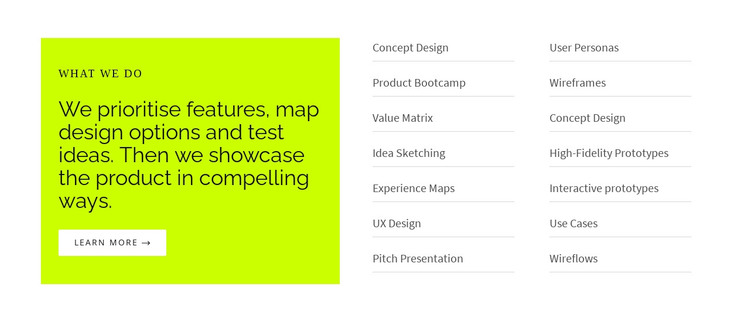
The lime panel gives this section a clear editorial entry point for a WordPress-managed page. The “WHAT WE DO” label introduces a longer statement about prioritising features, mapping design options, testing ideas, and showcasing a product. Beneath it, the single “Learn more” button offers one defined continuation for visitors who need additional information. This creates a stable content unit that can sit within a services, capabilities, or process-oriented page without requiring the surrounding site structure to be part of the block.
The accompanying list turns that broad statement into fourteen named areas of work. Concept Design, User Personas, Product Bootcamp, Wireframes, Value Matrix, Idea Sketching, High-Fidelity Prototypes, Experience Maps, Interactive prototypes, UX Design, Use Cases, Pitch Presentation, and Wireflows are arranged in two columns. Light horizontal separators distinguish the repeated labels, while the white list area keeps the content readable beside the stronger lime panel. The static arrangement suits information that should remain visible as page content rather than depend on a rotating interaction.
In a WordPress-oriented project, this block can function as a reusable visual section for a stable services or capabilities page. The page can place its own broader content around the section, while other WordPress-managed areas handle related pages or changing editorial material. The block’s value lies in preserving a clear relationship between introductory copy, one follow-up action, and a broad but scannable list of design capabilities.
Customize with Nicepage
Open this ready-made template in the WordPress Website Builder and customize it visually in the Nicepage editor. Replace demo content, edit page sections, and adapt the design to your project without rebuilding the template from scratch.
Edit Template Offline
2. Create a new page or select existing
3. Click Add new block, search for id 509552 and click enter
Edit Template Online
Create Awesome Websites


Free Nicepage Builder
Keywords
Manage and Edit This Theme in WordPress
Customize and Install the WordPress Theme
Start with this ready-made theme instead of building the WordPress design from scratch. Customize its layout, content, typography, images, sections, and other design elements visually in Nicepage editor, then export and install the WordPress Theme, Plugin, and Pages on your WordPress site. The Nicepage WordPress Plugin lets you continue working with the site after installation.
Edit the Theme Directly in WordPress
After installation, you can edit the WordPress Theme directly in WordPress with the Nicepage WordPress Plugin. Use Site Style to customize site Colors, Fonts, Header, Footer, Blog, and Post Page Templates while working within your WordPress website.
Edit WordPress Pages Visually
Use the Nicepage WordPress Plugin to edit page content directly from the WordPress admin area. Open a WordPress Page with Nicepage and visually change its text, images, sections, and other page elements while continuing to manage the Page through WordPress.
WordPress Content and Theme Integration
Use the customized theme with WordPress Pages, Posts, Blog and Post Templates, menus, widgets, and other CMS-managed content. Shared theme elements such as Colors, Fonts, Header, Footer, Blog, and Post Page Templates can be managed as part of the overall site design, while WordPress provides the CMS environment for managing site content.
This workflow combines a ready-made WordPress Theme with visual customization, direct theme editing in WordPress, and continued content management through the Nicepage WordPress Plugin.