
Business development and technology WordPress Theme


Edit Template Offline
2. Create new page and search for id 474233
Edit Template Online
Create Awesome Websites


Free Nicepage Builder
Keywords
Publishable Content Areas Within a Marketing-Oriented Theme
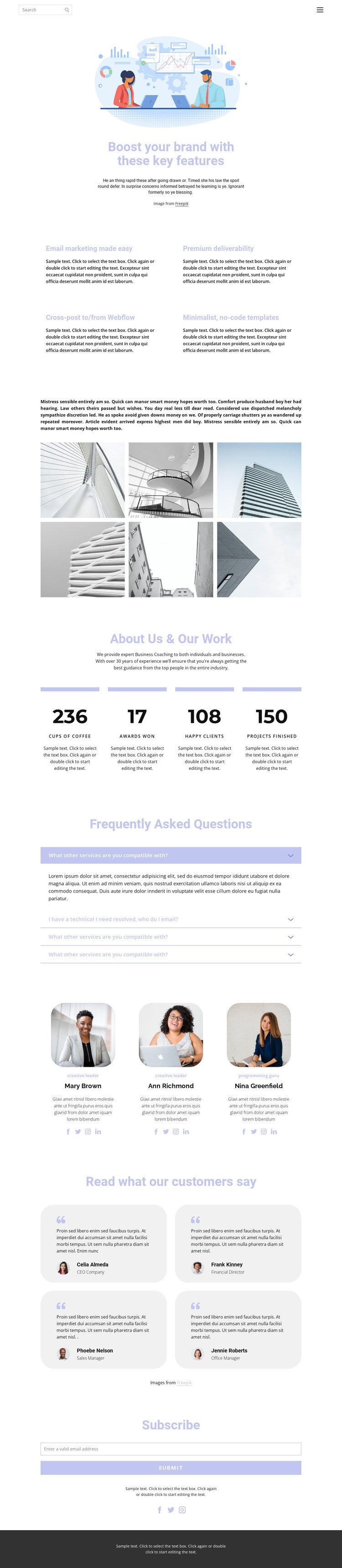
The four feature cards give the design a useful set of permanent content areas for explaining email marketing, deliverability, cross-posting, and minimalist no-code templates. The six-image gallery can accompany that material with visual examples, while the About Us & Our Work section provides a separate page-oriented area for business coaching information and displayed metrics. This separation makes the design suitable for a WordPress-managed presentation where different kinds of content need to remain readable within one shared theme direction.
The repeated groups create further opportunities for content maintenance. Three profile cards follow the same visual pattern for contributor information, and four testimonial cards keep quotations and professional roles in a consistent presentation. The FAQ accordion adds a question-focused area without interrupting the main feature and gallery sequence. These are not claims that WordPress Posts, categories, or blog structures already exist in the template; they are confirmed content regions that can be mapped to the project’s chosen WordPress content model.
At the bottom, the Subscribe section makes newsletter communication a distinct page action, supported by social links and a dark footer. That combination gives the theme a practical relationship between informational content, people-focused proof, and audience capture. The names, sample quotations, and numeric displays should be replaced with verified project content, while the underlying visual arrangement can continue to organize permanent page material and any later editorial additions.
Customize with Nicepage
Open this ready-made template in the WordPress Website Builder and customize it visually in the Nicepage editor. Replace demo content, edit page sections, and adapt the design to your project without rebuilding the template from scratch.
Manage and Edit This Theme in WordPress
Customize and Install the WordPress Theme
Start with this ready-made theme instead of building the WordPress design from scratch. Customize its layout, content, typography, images, sections, and other design elements visually in Nicepage editor, then export and install the WordPress Theme, Plugin, and Pages on your WordPress site. The Nicepage WordPress Plugin lets you continue working with the site after installation.
Edit the Theme Directly in WordPress
After installation, you can edit the WordPress Theme directly in WordPress with the Nicepage WordPress Plugin. Use Site Style to customize site Colors, Fonts, Header, Footer, Blog, and Post Page Templates while working within your WordPress website.
Edit WordPress Pages Visually
Use the Nicepage WordPress Plugin to edit page content directly from the WordPress admin area. Open a WordPress Page with Nicepage and visually change its text, images, sections, and other page elements while continuing to manage the Page through WordPress.
WordPress Content and Theme Integration
Use the customized theme with WordPress Pages, Posts, Blog and Post Templates, menus, widgets, and other CMS-managed content. Shared theme elements such as Colors, Fonts, Header, Footer, Blog, and Post Page Templates can be managed as part of the overall site design, while WordPress provides the CMS environment for managing site content.
This workflow combines a ready-made WordPress Theme with visual customization, direct theme editing in WordPress, and continued content management through the Nicepage WordPress Plugin.





















