Agency contacts WordPress Theme


Contact Details Become Stable Page Content Below a Social Panel
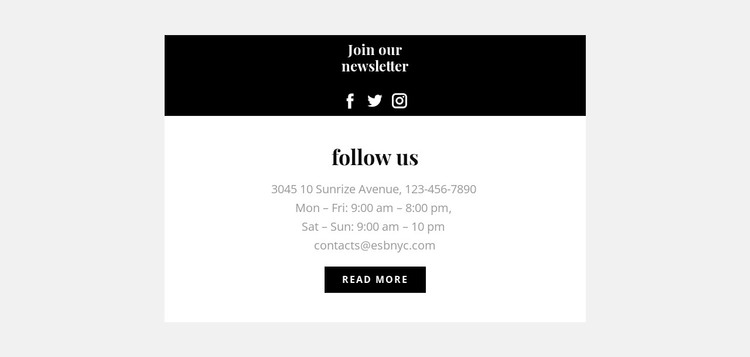
The lower white panel is especially suited to permanent page content because it gathers the practical information visitors may return to: an address, phone number, opening hours, and email. Its centered heading and compact read-more button keep that information within a recognizable contact area. Above it, the dark panel provides a different content layer, pairing the newsletter heading with three social media links and icons so visitors can move from direct contact details to broader social channels.
Within a WordPress-managed page, the block can serve as a reusable contact section while the wider project maintains other publishable content around it. The two-panel structure keeps the contact information visually stable instead of blending it into a long stream of unrelated text. At the same time, the social panel gives the section a second purpose without requiring the block to become a complete page or theme.
The contrast between black and white panels creates a simple content hierarchy that can remain recognizable when the section is placed on different pages. The light gray outer background frames the block, while serif headings and generous vertical spacing provide separation between the two content groups. A WordPress-oriented project can retain this visual arrangement as page content and adapt the surrounding material independently.
Customize with Nicepage
Open this ready-made template in the WordPress Website Builder and customize it visually in the Nicepage editor. Replace demo content, edit page sections, and adapt the design to your project without rebuilding the template from scratch.
Edit Template Offline
2. Create a new page or select existing
3. Click Add new block, search for id 431755 and click enter
Edit Template Online
Create Awesome Websites


Free Nicepage Builder
Keywords
Manage and Edit This Theme in WordPress
Customize and Install the WordPress Theme
Start with this ready-made theme instead of building the WordPress design from scratch. Customize its layout, content, typography, images, sections, and other design elements visually in Nicepage editor, then export and install the WordPress Theme, Plugin, and Pages on your WordPress site. The Nicepage WordPress Plugin lets you continue working with the site after installation.
Edit the Theme Directly in WordPress
After installation, you can edit the WordPress Theme directly in WordPress with the Nicepage WordPress Plugin. Use Site Style to customize site Colors, Fonts, Header, Footer, Blog, and Post Page Templates while working within your WordPress website.
Edit WordPress Pages Visually
Use the Nicepage WordPress Plugin to edit page content directly from the WordPress admin area. Open a WordPress Page with Nicepage and visually change its text, images, sections, and other page elements while continuing to manage the Page through WordPress.
WordPress Content and Theme Integration
Use the customized theme with WordPress Pages, Posts, Blog and Post Templates, menus, widgets, and other CMS-managed content. Shared theme elements such as Colors, Fonts, Header, Footer, Blog, and Post Page Templates can be managed as part of the overall site design, while WordPress provides the CMS environment for managing site content.
This workflow combines a ready-made WordPress Theme with visual customization, direct theme editing in WordPress, and continued content management through the Nicepage WordPress Plugin.