Durable Steel Structures WordPress Theme


Stable Industrial Page Content With a Distinct Visual Section Pattern
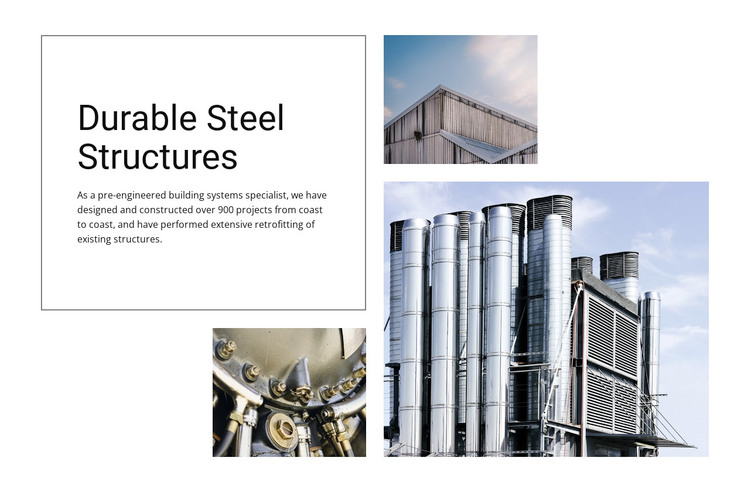
The heading “Durable Steel Structures” and the supporting paragraph read as lasting company or capabilities information rather than time-sensitive editorial material. The paragraph’s references to pre-engineered building systems and retrofitting existing structures give a WordPress-managed page a defined subject, while the thin gray border creates a consistent boundary around that text. This makes the copy easy to recognize as one persistent section within a larger page.
The image group adds visual context without changing the content role. Three cool-toned industrial structure photographs form an offset collage, and the large right-side image of industrial ventilation or processing equipment carries the strongest emphasis. The upper and lower photographs balance that dominant image through repetition of rectangular forms and related subject matter. Because the block is static, the page presents the capabilities message directly rather than relying on a changing feed or expandable control.
In a WordPress-oriented project, the section can remain a reusable page-content pattern while the wider site manages other company information and publishing needs. Its visual arrangement can support a services or About page without being treated as a complete theme. The important relationship is between stable explanatory copy and durable industrial imagery: both remain together as one recognizable section that can be maintained alongside other CMS-managed content.
Customize with Nicepage
Open this ready-made template in the WordPress Website Builder and customize it visually in the Nicepage editor. Replace demo content, edit page sections, and adapt the design to your project without rebuilding the template from scratch.
Edit Template Offline
2. Create a new page or select existing
3. Click Add new block, search for id 42392 and click enter
Edit Template Online
Create Awesome Websites


Free Nicepage Builder
Keywords
Manage and Edit This Theme in WordPress
Customize and Install the WordPress Theme
Start with this ready-made theme instead of building the WordPress design from scratch. Customize its layout, content, typography, images, sections, and other design elements visually in Nicepage editor, then export and install the WordPress Theme, Plugin, and Pages on your WordPress site. The Nicepage WordPress Plugin lets you continue working with the site after installation.
Edit the Theme Directly in WordPress
After installation, you can edit the WordPress Theme directly in WordPress with the Nicepage WordPress Plugin. Use Site Style to customize site Colors, Fonts, Header, Footer, Blog, and Post Page Templates while working within your WordPress website.
Edit WordPress Pages Visually
Use the Nicepage WordPress Plugin to edit page content directly from the WordPress admin area. Open a WordPress Page with Nicepage and visually change its text, images, sections, and other page elements while continuing to manage the Page through WordPress.
WordPress Content and Theme Integration
Use the customized theme with WordPress Pages, Posts, Blog and Post Templates, menus, widgets, and other CMS-managed content. Shared theme elements such as Colors, Fonts, Header, Footer, Blog, and Post Page Templates can be managed as part of the overall site design, while WordPress provides the CMS environment for managing site content.
This workflow combines a ready-made WordPress Theme with visual customization, direct theme editing in WordPress, and continued content management through the Nicepage WordPress Plugin.