Level up your brand today WordPress Theme


Edit Template Offline
2. Create new page and search for id 4147518
Edit Template Online
Create Awesome Websites


Free Nicepage Builder
Keywords
A Contact Page Built Around Persistent Content and Visitor Submissions
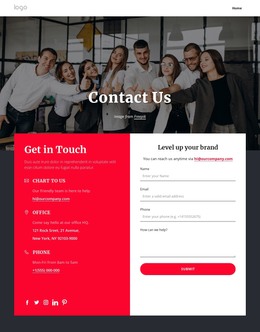
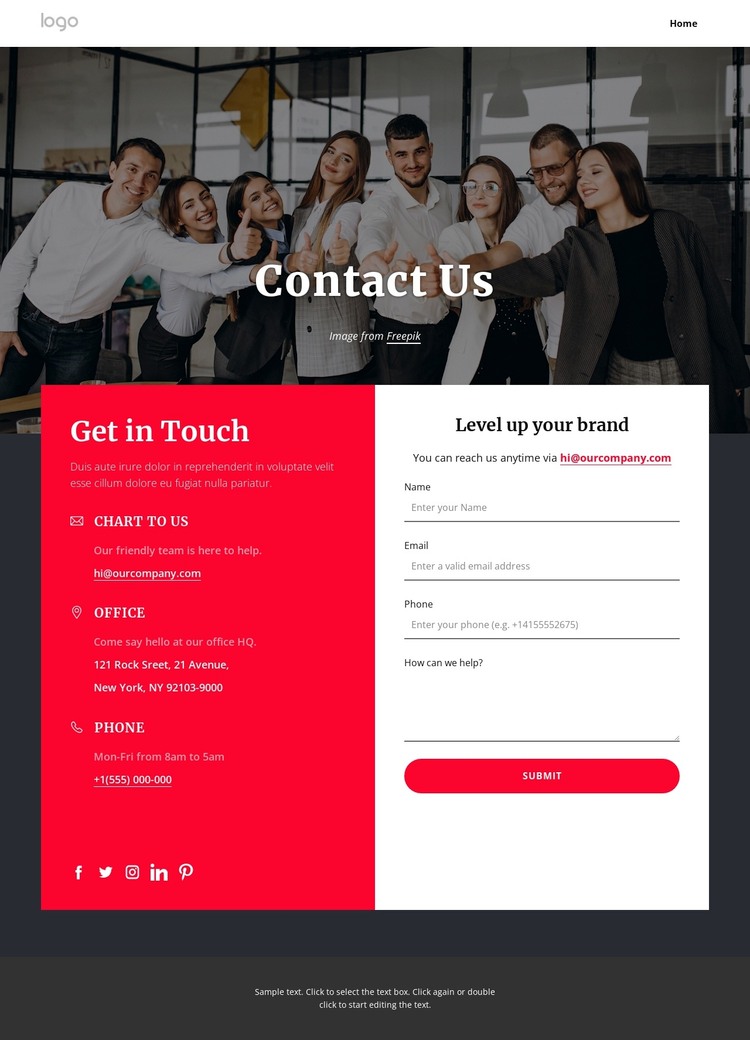
The navigation gives this design a clear page-oriented starting point. The header links Home, About, Landing, Contact Us, and Portfolio, so the contact screen can sit within a wider set of permanent website content rather than functioning as an isolated form. Its logo area and responsive menu control also provide shared site elements that can frame additional pages using the same visual direction.
The group photograph and Contact Us heading establish the page context quickly, while the main two-panel area separates information from response. One panel contains three contact entries for email, office, and phone communication, supported by Facebook, Twitter, and Instagram links. The other places the “Level up your brand” heading above fields for name, email, phone, and message. This arrangement suits a WordPress-managed project because the page has distinct content areas that can be maintained as practical contact information, brand messaging, and visitor-submission content rather than one undifferentiated text block.
The dark footer supplies a consistent closing region for the page and leaves room for the same shared visual boundary across related site content. The verified design does not prove that blog posts or other WordPress-specific content already exist. Instead, its permanent contact sections, navigation, social links, and form provide a focused theme foundation for a site whose page content may grow around this established contact experience.
Customize with Nicepage
Open this ready-made template in the WordPress Website Builder and customize it visually in the Nicepage editor. Replace demo content, edit page sections, and adapt the design to your project without rebuilding the template from scratch.
Manage and Edit This Theme in WordPress
Customize and Install the WordPress Theme
Start with this ready-made theme instead of building the WordPress design from scratch. Customize its layout, content, typography, images, sections, and other design elements visually in Nicepage editor, then export and install the WordPress Theme, Plugin, and Pages on your WordPress site. The Nicepage WordPress Plugin lets you continue working with the site after installation.
Edit the Theme Directly in WordPress
After installation, you can edit the WordPress Theme directly in WordPress with the Nicepage WordPress Plugin. Use Site Style to customize site Colors, Fonts, Header, Footer, Blog, and Post Page Templates while working within your WordPress website.
Edit WordPress Pages Visually
Use the Nicepage WordPress Plugin to edit page content directly from the WordPress admin area. Open a WordPress Page with Nicepage and visually change its text, images, sections, and other page elements while continuing to manage the Page through WordPress.
WordPress Content and Theme Integration
Use the customized theme with WordPress Pages, Posts, Blog and Post Templates, menus, widgets, and other CMS-managed content. Shared theme elements such as Colors, Fonts, Header, Footer, Blog, and Post Page Templates can be managed as part of the overall site design, while WordPress provides the CMS environment for managing site content.
This workflow combines a ready-made WordPress Theme with visual customization, direct theme editing in WordPress, and continued content management through the Nicepage WordPress Plugin.