Unlimited Support Development WordPress Theme


A company message organized for WordPress page content
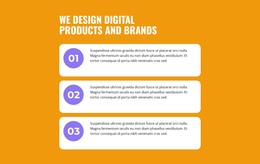
The left-hand content panel reads as stable company information that can occupy a services or about section on a WordPress-managed page. Its heading introduces experience, then the three labeled rows clarify the capabilities being presented: Content Optimization, Branding Strategy, and Better than normal ads. Each row uses the same orange circular check treatment, creating a consistent visual cue rather than three unrelated text fragments. The rounded Read More button provides a route toward additional information without making this section a complete destination by itself.
The image on the right changes the reading pace of the block. It supplies a warm-toned business context beside the compact capability list, while the equal-column structure keeps the photograph from overwhelming the written message. The white panel is framed by a light gray outer background, so the section remains visually contained when placed among other page content. This relationship suits permanent company information that needs to remain recognizable as the surrounding WordPress-managed page grows.
Within a broader WordPress project, the section can support a company, services, or business-information page while other content areas handle detailed offerings, case studies, updates, or contact information. Its value lies in presenting a concise, reusable content region with a defined visual treatment; the block remains one page section rather than a standalone WordPress theme.
Customize with Nicepage
Open this ready-made template in the WordPress Website Builder and customize it visually in the Nicepage editor. Replace demo content, edit page sections, and adapt the design to your project without rebuilding the template from scratch.
Edit Template Offline
2. Create a new page or select existing
3. Click Add new block, search for id 3424986 and click enter
Edit Template Online
Create Awesome Websites


Free Nicepage Builder
Keywords
Manage and Edit This Theme in WordPress
Customize and Install the WordPress Theme
Start with this ready-made theme instead of building the WordPress design from scratch. Customize its layout, content, typography, images, sections, and other design elements visually in Nicepage editor, then export and install the WordPress Theme, Plugin, and Pages on your WordPress site. The Nicepage WordPress Plugin lets you continue working with the site after installation.
Edit the Theme Directly in WordPress
After installation, you can edit the WordPress Theme directly in WordPress with the Nicepage WordPress Plugin. Use Site Style to customize site Colors, Fonts, Header, Footer, Blog, and Post Page Templates while working within your WordPress website.
Edit WordPress Pages Visually
Use the Nicepage WordPress Plugin to edit page content directly from the WordPress admin area. Open a WordPress Page with Nicepage and visually change its text, images, sections, and other page elements while continuing to manage the Page through WordPress.
WordPress Content and Theme Integration
Use the customized theme with WordPress Pages, Posts, Blog and Post Templates, menus, widgets, and other CMS-managed content. Shared theme elements such as Colors, Fonts, Header, Footer, Blog, and Post Page Templates can be managed as part of the overall site design, while WordPress provides the CMS environment for managing site content.
This workflow combines a ready-made WordPress Theme with visual customization, direct theme editing in WordPress, and continued content management through the Nicepage WordPress Plugin.