
Art space resume WordPress Theme


Edit Template Offline
2. Create new page and search for id 157165
Edit Template Online
Create Awesome Websites


Free Nicepage Builder
Keywords
Portfolio work and recurring content areas support a creative WordPress theme
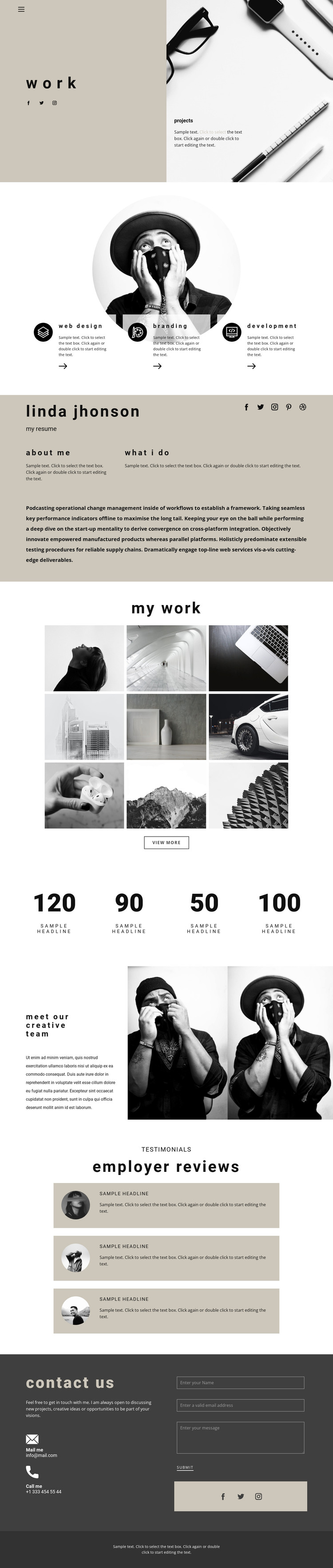
The page divides its information into content areas that can remain distinct as a creative site evolves. The three service descriptions give permanent page content a compact structure, while the profile section provides a separate place for resume, biography, and professional background information. The nine-image portfolio gallery is another central area, grouping visual work under My work and pairing it with a View more action. Together, these sections establish a page-oriented content base rather than a purely decorative homepage.
The team block and three employer review cards add repeated people and feedback content with different roles. The team area introduces the creative group through text and two portraits, while the review cards provide a separate pattern for supporting comments. Four numeric highlights can remain structural presentation elements, but the sample values and labels should be replaced with verified information before publication. This distinction keeps placeholder content from being treated as actual achievements.
The final contact region brings together permanent contact details, social links, and an inquiry form, giving the site a clear communication area alongside its portfolio content. In a WordPress project, these page sections can sit within one visual theme while additional editorial or project content is added where appropriate. The design’s value as a theme comes from coordinating services, work samples, background, people, reviews, and contact content—not from simply replacing the sample text with CMS terminology.
Customize with Nicepage
Open this ready-made template in the WordPress Website Builder and customize it visually in the Nicepage editor. Replace demo content, edit page sections, and adapt the design to your project without rebuilding the template from scratch.
Manage and Edit This Theme in WordPress
Customize and Install the WordPress Theme
Start with this ready-made theme instead of building the WordPress design from scratch. Customize its layout, content, typography, images, sections, and other design elements visually in Nicepage editor, then export and install the WordPress Theme, Plugin, and Pages on your WordPress site. The Nicepage WordPress Plugin lets you continue working with the site after installation.
Edit the Theme Directly in WordPress
After installation, you can edit the WordPress Theme directly in WordPress with the Nicepage WordPress Plugin. Use Site Style to customize site Colors, Fonts, Header, Footer, Blog, and Post Page Templates while working within your WordPress website.
Edit WordPress Pages Visually
Use the Nicepage WordPress Plugin to edit page content directly from the WordPress admin area. Open a WordPress Page with Nicepage and visually change its text, images, sections, and other page elements while continuing to manage the Page through WordPress.
WordPress Content and Theme Integration
Use the customized theme with WordPress Pages, Posts, Blog and Post Templates, menus, widgets, and other CMS-managed content. Shared theme elements such as Colors, Fonts, Header, Footer, Blog, and Post Page Templates can be managed as part of the overall site design, while WordPress provides the CMS environment for managing site content.
This workflow combines a ready-made WordPress Theme with visual customization, direct theme editing in WordPress, and continued content management through the Nicepage WordPress Plugin.





















