
Destiny photo studio WordPress Theme
Edit Template Offline
2. Create new page and search for id 33580
Edit Template Online
Create Awesome Websites


Free Nicepage Builder
Keywords
Page Content and Repeated Agency Areas Suit WordPress Management
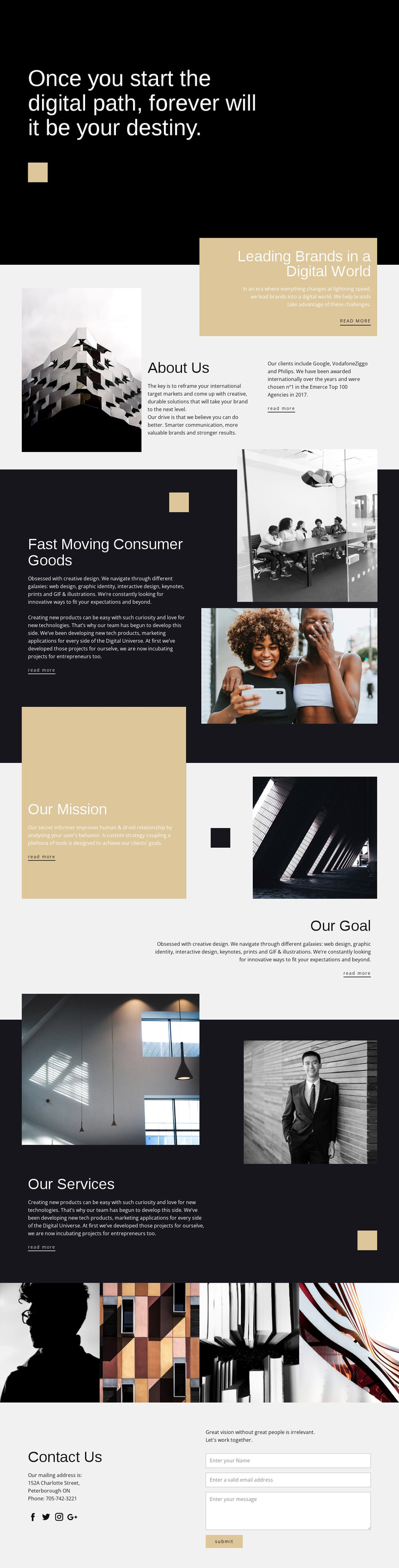
The permanent page content is divided into subjects that can remain recognizable as a WordPress-managed site grows. Leading Brands in a Digital World and About Us provide page-oriented organizational information, while the capabilities section groups creative services and technology products with supporting photography. These areas can hold the agency’s core presentation, leaving the repeated service subjects and visual material easy to distinguish from the broader mission and goal statements.
The Our Services block offers another useful content boundary. Its categories—web design, graphic identity, interactive design, keynotes, prints, illustrations, technology products, and marketing applications—are already introduced as a related group, so future content can expand individual offerings without losing the relationship between them. The four-image gallery adds a separate visual area, while the Facebook, Twitter, Instagram, and Google links connect the presentation to external audience channels.
The final Contact Us section provides the clearest interaction area, with mailing details beside a form containing name, email, and message inputs. In a WordPress project, these permanent sections could remain part of the theme’s visual system while additional editorial or agency content is added around them; the analysis does not claim that posts, categories, or blog structures already exist. The key strength is the design’s separation of organizational copy, capability content, imagery, social references, and inquiries into areas that can be maintained as distinct site content.
Customize with Nicepage
Open this ready-made template in the WordPress Website Builder and customize it visually in the Nicepage editor. Replace demo content, edit page sections, and adapt the design to your project without rebuilding the template from scratch.
Manage and Edit This Theme in WordPress
Customize and Install the WordPress Theme
Start with this ready-made theme instead of building the WordPress design from scratch. Customize its layout, content, typography, images, sections, and other design elements visually in Nicepage editor, then export and install the WordPress Theme, Plugin, and Pages on your WordPress site. The Nicepage WordPress Plugin lets you continue working with the site after installation.
Edit the Theme Directly in WordPress
After installation, you can edit the WordPress Theme directly in WordPress with the Nicepage WordPress Plugin. Use Site Style to customize site Colors, Fonts, Header, Footer, Blog, and Post Page Templates while working within your WordPress website.
Edit WordPress Pages Visually
Use the Nicepage WordPress Plugin to edit page content directly from the WordPress admin area. Open a WordPress Page with Nicepage and visually change its text, images, sections, and other page elements while continuing to manage the Page through WordPress.
WordPress Content and Theme Integration
Use the customized theme with WordPress Pages, Posts, Blog and Post Templates, menus, widgets, and other CMS-managed content. Shared theme elements such as Colors, Fonts, Header, Footer, Blog, and Post Page Templates can be managed as part of the overall site design, while WordPress provides the CMS environment for managing site content.
This workflow combines a ready-made WordPress Theme with visual customization, direct theme editing in WordPress, and continued content management through the Nicepage WordPress Plugin.





















