Jump and conquer WordPress Theme


A Dated Fitness Offering Suited to Stable WordPress Page Content
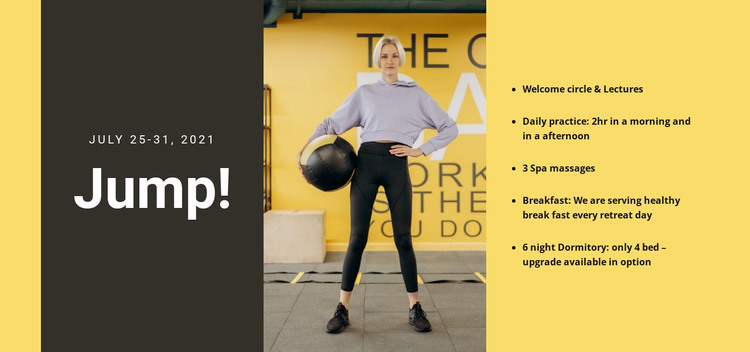
The “Jump!” heading and July 25–31, 2021 date make this section read as a defined retreat offering rather than a stream of time-sensitive posts. That distinction gives it a practical role in WordPress-managed page content: it can present a stable overview of one experience while the wider site contains other pages or regularly updated material.
The content is organized around a useful progression. The dark left panel names the retreat, the central portrait photograph establishes its physical and active character, and the right column explains what participation includes. Five separate points cover the welcome circle and lectures, two-hour morning and afternoon practice, three spa massages, breakfast each retreat day, and six nights in a four-bed dormitory with an upgrade option. The list supplies concrete detail without overwhelming the image-led composition.
As part of a WordPress-oriented page, the block can remain a reusable visual section for a retreat, wellness program, or event description. It may sit beside fuller editorial content, schedules, testimonials, or a separate inquiry area, while keeping its own compact content function. The warm yellow background, black text, and charcoal panel also give the section a recognizable presentation that can be retained when the surrounding page content is maintained through the CMS. The block itself remains page content, not a standalone WordPress Theme.
Customize with Nicepage
Open this ready-made template in the WordPress Website Builder and customize it visually in the Nicepage editor. Replace demo content, edit page sections, and adapt the design to your project without rebuilding the template from scratch.
Edit Template Offline
2. Create a new page or select existing
3. Click Add new block, search for id 310511 and click enter
Edit Template Online
Create Awesome Websites


Free Nicepage Builder
Keywords
Manage and Edit This Theme in WordPress
Customize and Install the WordPress Theme
Start with this ready-made theme instead of building the WordPress design from scratch. Customize its layout, content, typography, images, sections, and other design elements visually in Nicepage editor, then export and install the WordPress Theme, Plugin, and Pages on your WordPress site. The Nicepage WordPress Plugin lets you continue working with the site after installation.
Edit the Theme Directly in WordPress
After installation, you can edit the WordPress Theme directly in WordPress with the Nicepage WordPress Plugin. Use Site Style to customize site Colors, Fonts, Header, Footer, Blog, and Post Page Templates while working within your WordPress website.
Edit WordPress Pages Visually
Use the Nicepage WordPress Plugin to edit page content directly from the WordPress admin area. Open a WordPress Page with Nicepage and visually change its text, images, sections, and other page elements while continuing to manage the Page through WordPress.
WordPress Content and Theme Integration
Use the customized theme with WordPress Pages, Posts, Blog and Post Templates, menus, widgets, and other CMS-managed content. Shared theme elements such as Colors, Fonts, Header, Footer, Blog, and Post Page Templates can be managed as part of the overall site design, while WordPress provides the CMS environment for managing site content.
This workflow combines a ready-made WordPress Theme with visual customization, direct theme editing in WordPress, and continued content management through the Nicepage WordPress Plugin.