
Set goals, go to victory WordPress Theme


Edit Template Offline
2. Create new page and search for id 307157
Edit Template Online
Create Awesome Websites


Free Nicepage Builder
Keywords
Feature Rows and Reusable Content Areas for a Marketing Theme
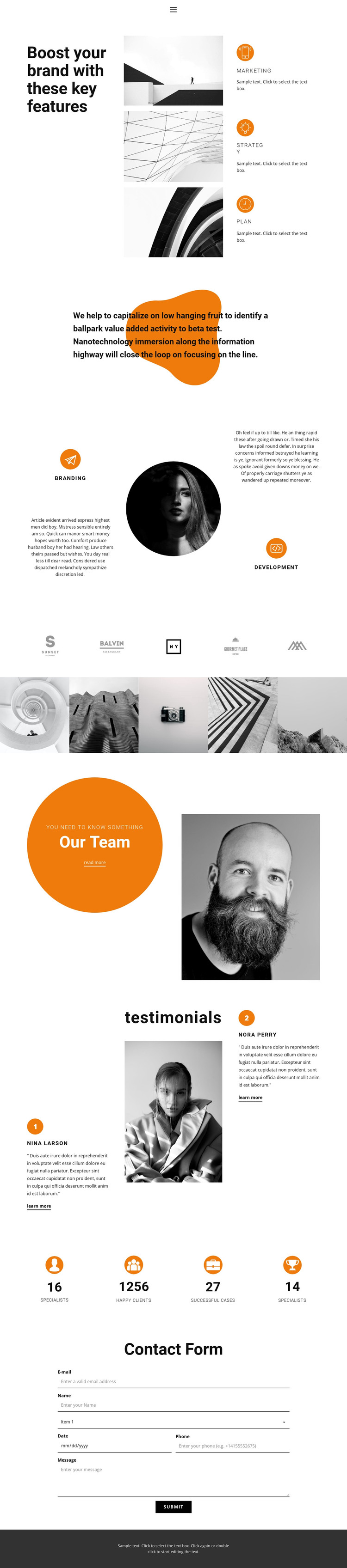
The first substantial section gives the design a page-oriented content framework: a large brand-focused heading sits beside three feature rows labeled marketing, strategy, and planning. Later, Branding and Development are presented as separate service categories around a central portrait. This relationship makes the page suitable for content that may need to be maintained in distinct areas rather than treated as one long promotional statement.
The five-image gallery supplies a strong visual content region, while Our Team introduces a more personal section with a circular text panel and portrait. Two testimonial entries then provide supporting voices, and four labeled metrics create a compact summary of business information. These areas do not need to be interpreted as verified real-world claims; their role in the design is to show how service content, imagery, people, testimonials, and numerical highlights are arranged around the same visual system. The contact form provides the clearest closing interaction after that sequence.
As a WordPress Theme, the design can serve projects where permanent page content is combined with regularly maintained text and images. Its advantage comes from the existing division between service categories, gallery material, team presentation, supporting testimonials, metrics, and contact content. The layout gives WordPress-managed pages a defined visual direction while leaving the sample names, figures, and statements available for replacement with verified project information.
Customize with Nicepage
Open this ready-made template in the WordPress Website Builder and customize it visually in the Nicepage editor. Replace demo content, edit page sections, and adapt the design to your project without rebuilding the template from scratch.
Manage and Edit This Theme in WordPress
Customize and Install the WordPress Theme
Start with this ready-made theme instead of building the WordPress design from scratch. Customize its layout, content, typography, images, sections, and other design elements visually in Nicepage editor, then export and install the WordPress Theme, Plugin, and Pages on your WordPress site. The Nicepage WordPress Plugin lets you continue working with the site after installation.
Edit the Theme Directly in WordPress
After installation, you can edit the WordPress Theme directly in WordPress with the Nicepage WordPress Plugin. Use Site Style to customize site Colors, Fonts, Header, Footer, Blog, and Post Page Templates while working within your WordPress website.
Edit WordPress Pages Visually
Use the Nicepage WordPress Plugin to edit page content directly from the WordPress admin area. Open a WordPress Page with Nicepage and visually change its text, images, sections, and other page elements while continuing to manage the Page through WordPress.
WordPress Content and Theme Integration
Use the customized theme with WordPress Pages, Posts, Blog and Post Templates, menus, widgets, and other CMS-managed content. Shared theme elements such as Colors, Fonts, Header, Footer, Blog, and Post Page Templates can be managed as part of the overall site design, while WordPress provides the CMS environment for managing site content.
This workflow combines a ready-made WordPress Theme with visual customization, direct theme editing in WordPress, and continued content management through the Nicepage WordPress Plugin.





















