Leading advisory firms and management consulting WordPress Theme


Rotating Service Content Within a WordPress Page
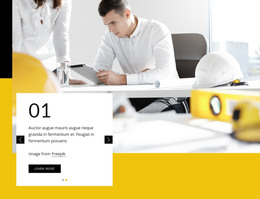
The carousel presents Consulting and Marketing as two related service-content views. Each slide has its own heading, descriptive paragraph, and learn more link, allowing a WordPress-managed page to keep the offerings together without showing two separate card groups at once. The previous and next controls provide the relationship between the slides, while the shared background maintains continuity as the active content changes.
A white rectangular card carries the readable information and sits over a darkened, full-width office workspace photograph. This contrast gives the service content a defined visual container, with the left alignment guiding attention toward the heading and the compact paragraph before the outlined action link. In a WordPress-oriented project, the arrangement can serve as permanent services-page content while other CMS-managed areas provide supporting pages, posts, or additional business information.
The block is especially suited to a theme context where a consistent visual section needs to present more than one offering without becoming a complete theme or site structure. Its repeated slide pattern can be retained as the content area evolves, and the two labels provide a direct distinction between the service views. The wider WordPress project remains responsible for page organization and surrounding content; this section contributes the rotating Consulting and Marketing presentation.
Customize with Nicepage
Open this ready-made template in the WordPress Website Builder and customize it visually in the Nicepage editor. Replace demo content, edit page sections, and adapt the design to your project without rebuilding the template from scratch.
Edit Template Offline
2. Create a new page or select existing
3. Click Add new block, search for id 2371505 and click enter
Edit Template Online
Create Awesome Websites


Free Nicepage Builder
Keywords
Manage and Edit This Theme in WordPress
Customize and Install the WordPress Theme
Start with this ready-made theme instead of building the WordPress design from scratch. Customize its layout, content, typography, images, sections, and other design elements visually in Nicepage editor, then export and install the WordPress Theme, Plugin, and Pages on your WordPress site. The Nicepage WordPress Plugin lets you continue working with the site after installation.
Edit the Theme Directly in WordPress
After installation, you can edit the WordPress Theme directly in WordPress with the Nicepage WordPress Plugin. Use Site Style to customize site Colors, Fonts, Header, Footer, Blog, and Post Page Templates while working within your WordPress website.
Edit WordPress Pages Visually
Use the Nicepage WordPress Plugin to edit page content directly from the WordPress admin area. Open a WordPress Page with Nicepage and visually change its text, images, sections, and other page elements while continuing to manage the Page through WordPress.
WordPress Content and Theme Integration
Use the customized theme with WordPress Pages, Posts, Blog and Post Templates, menus, widgets, and other CMS-managed content. Shared theme elements such as Colors, Fonts, Header, Footer, Blog, and Post Page Templates can be managed as part of the overall site design, while WordPress provides the CMS environment for managing site content.
This workflow combines a ready-made WordPress Theme with visual customization, direct theme editing in WordPress, and continued content management through the Nicepage WordPress Plugin.